

Hosun
Inspiring
June 25, 2019
Answered

hamburger memu

  • June 25, 2019
  • 1 reply
  • 979 views

Hi,

Long ago, I got scripts.js from osgood_ for Roar Cycles 4. 

I applied the same js to Hosuns Portfolio 4 with the change in line 5.

But it doesn't work.

Would you help me?

Roar Cycles 4

Hosuns Portfolio 4

Hosun Kang

In the beginning, I wrote.

$('.menu-toggle').click(function(){

            $('.site-nav').toggleClass('site-nav--open');

            $(this).toggleClass('open');

})

But osgood's version makes the menu spread out more smoothly.
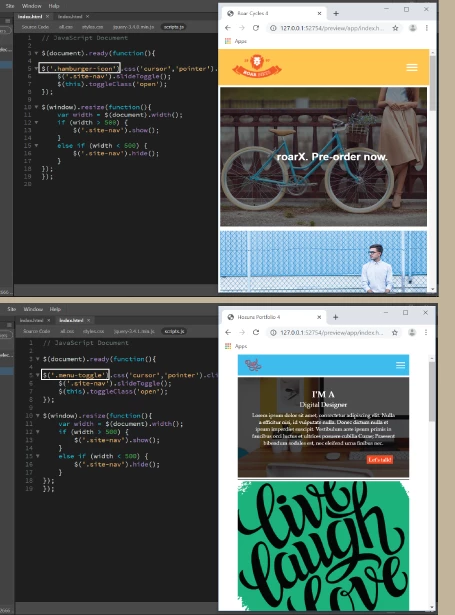
Message was edited by: Ben Pleysier to call out osgood_

This topic has been closed for replies.
Correct answer osgood_

In your 500px media query.

Change this:

.site-nav {

background-color: darksalmon;

width: 100%;

height: 0px;

overflow: hidden;

}

To this:

.site-nav {

background-color: darksalmon;

width: 100%;

display: none;

}

1 reply

osgood_Correct answer
Legend
June 25, 2019

In your 500px media query.

Change this:

.site-nav {

background-color: darksalmon;

width: 100%;

height: 0px;

overflow: hidden;

}

To this:

.site-nav {

background-color: darksalmon;

width: 100%;

display: none;

}

Hosun
HosunAuthor
Inspiring
June 25, 2019

Hi,

Thank you very much for your reply.

I have another different question.

Long ago, I exchanged Q&A below.

In my work, I just put in "hover" only.

Hosuns Portfolio 4

What is the best combination, USUALLY?

1. hover

2. hover+focus

3. hover+active

Hosun Kang

Legend
June 25, 2019

I only use hover. I don't use focus and active, other developers will have a different workflow.