



Preran
Legend
June 21, 2016
Question

Welcome all! Dreamweaver beta is now live!
  • June 21, 2016
  • 20 replies
  • 25954 views

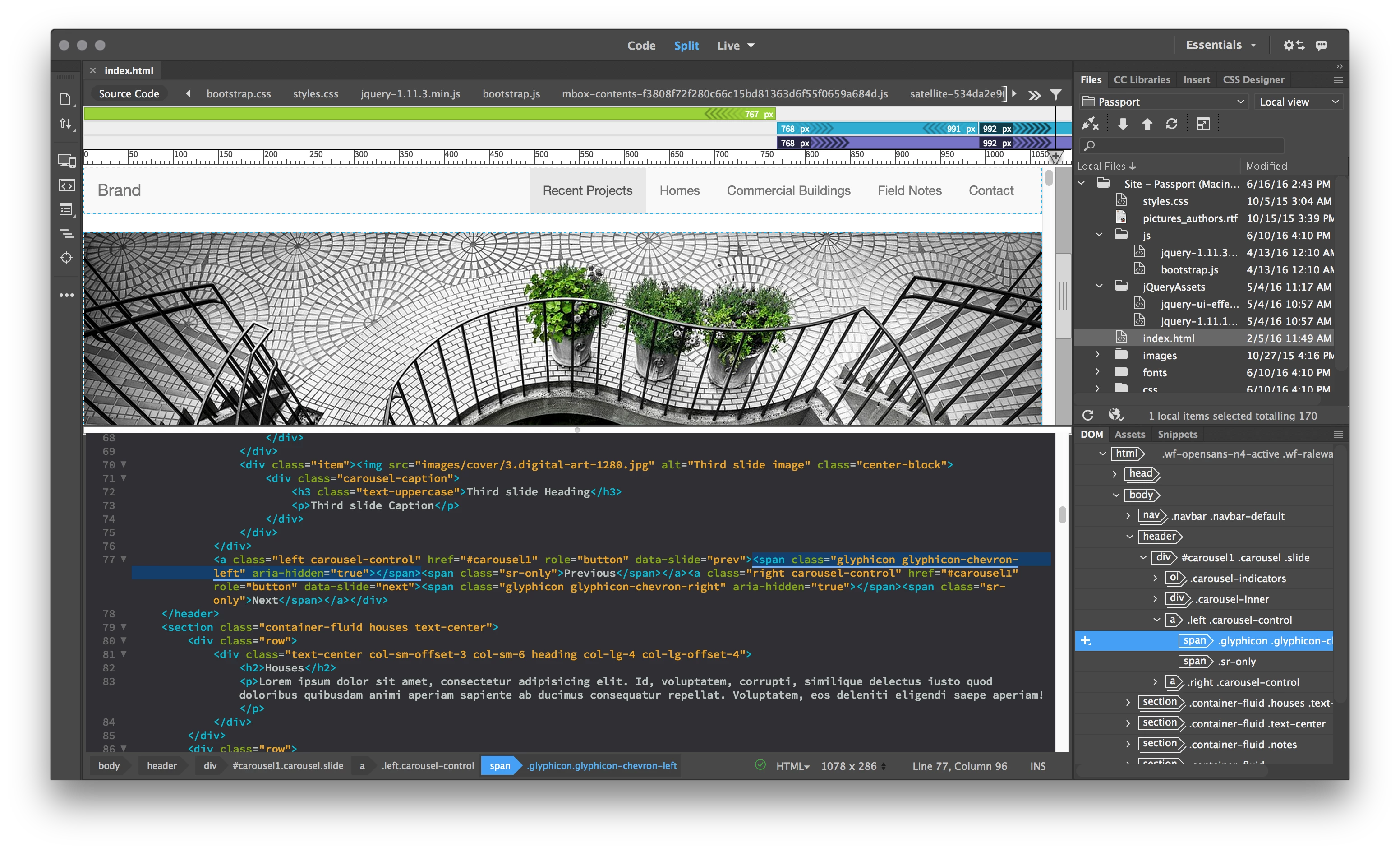
The Dreamweaver Beta is an early look at future developments for Dreamweaver. Dreamweaver is undergoing significant transformations to be faster, leaner, and completely modernized. The Beta is available for Dreamweaver users to give us feedback, in an effort to help us make it better.

Downloads, Bugs, discussions, and feature requests for Dreamweaver Beta

Please use the links in the Beta site (adobe.ly/dw_beta) to download the application. The beta build is not available through the Creative Cloud desktop application.

Dreamweaver beta forum: Use the links within the Dreamweaver Beta site to discuss issues and features related to the beta release.

Bug and feature requests: Use  https://dreamweaver.uservoice.com/

What’s new document: https://helpx.adobe.com/pdf/beta/releasenotes.pdf

Thanks,

Preran

    This topic has been closed for replies.

    20 replies

    jonlimwm
    Participant
    July 12, 2016

    Like the new Dreamweaver beta! Nice color codes and faster uploads. Good Job

    Inspiring
    July 8, 2016

    I love the new look and platform. nice color codes and on the eyes with black bk ground. Faster uploads noticed too.  good job DW adobe crew

    hans-g.
    Legend
    July 2, 2016

    Hi Preran,

    an Adobe friend and I of myself we would like to support and comment the one and the other idea in

    Adobe Dreamweaver: Ideas: Top (208 ideas) – Adobe Dreamweaver CC (2017 Beta): Feature Ideas

    with our real "Adobe names." This happened andbecause of the better English I quote: "For some reason, although I logged in with the e-mail address that I'm using for my Adobe account, my comment shows up as Anonymous. Sorry about that."

    What did we wrong? Is there a bug?

    Thanks for answering in advance.

    Hans-Günter

    Nancy OShea
    Community Expert
    Community Expert
    July 2, 2016

    Did you enter your name in the box?

    Nancy O'Shea— Product User & Community Expert
    hans-g.
    Legend
    July 3, 2016

    Hi Nancy,

    thanks for your answer. I'm really sure, that I/we used all(!) our names (real and Adobe's). Perhaps the problem arises again maybe next time. In this case I'll come back.

    Hans-Günter

    Participating Frequently
    June 27, 2016

    Why was the snippet system gutted? Removing keyboard short cuts from snippets (other than this tab business) and removing the ability to have a snippet wrap around selection is a pretty big hit to the snippet system.

    Its one of the features that kept me using dreamweaver. Also, cfscript isn't syntax highlighting for whatever reason.

    Nancy OShea
    Community Expert
    Community Expert
    June 27, 2016

    Go to the Beta Forum to post your Beta questions.

    Dreamweaver Beta site

    Some features have not been turned on yet.  Other features will be implemented in a future build.

    Nancy O.

    Nancy O'Shea— Product User & Community Expert
    Nancy OShea
    Community Expert
    Community Expert
    June 27, 2016

    I don't know if it's related to the JIVE update earlier this morning, but I can't get into the Beta site.  Boxes spin but nothing happens.

    Nancy O.

    Nancy O'Shea— Product User & Community Expert
    RossORankin
    Participant
    June 23, 2016

    Are there any plans to allow customization of the code colours? I like the new colours in the Dark theme, however the comments are now a dark grey colour that blends in and I preffered them with a bright visible colour.

    Participating Frequently
    June 23, 2016

    It's tough to even consider if you don't have Server Behaviors and other basic related features that allow PHP programming and MySQL or MSSQL.

    Not to sideline the thread but who really uses DW for any extended period of time and does not end up actually programming and using plugins that allow faster prototyping?

    Inspiring
    June 21, 2016

    I'm getting an error trying to install it on a machine also running macOS Sierra:

    The installation cannot continue as the installer file may be damaged. Download the installer file again.

    I've tried a couple of times now without any luck.

    Any suggestions, or is it most likely beta on beta not liking each other?

    Participating Frequently
    June 22, 2016

    Hi Iain,

    We are aware of this issue and this is issue is specific to Mac 10.12.

    Bug is still under investigation, hope will be fixed by next DW Beta release.

    Meanwhile you can try below workaround:

    * Open the terminal.

    * Run "sudo spctl --master-disable" ( This Disables the assessment subsystem altogether. Operations that would be denied by system policy will be allowed to proceed; assessment APIs always report success. Requires root access.)

    * Run "spctl --status" (Verify that you see "assessments disabled")

    * Click on Dreamweaver Beta Set-up to install

    * Once installation is completed, run "sudo spctl --master-enable" in Terminal

    * Run "spctl --status" (Verify that you see "assessments enabled")

    Also, when testing DW Beta on Mac 10.12 we have seen many instances of crash on launch.

    Let us know if you need more information

    Thanks,

    Lalita

    Colin Holgate
    Inspiring
    July 13, 2016

    I didn't see a reply here (about the Sierra installer issues), but I have the same issue on a different beta. The suggested work around didn't help. Have you figured out anything new in the last three weeks?

    Legend
    June 21, 2016

    Thanks Preran - I'll download it in the coming days and give it a spin.

    Nancy OShea
    Community Expert
    Community Expert
    June 21, 2016

    Os, You'll hate the dark UI.  Keep in mind, it's work in progress. 

    Nancy O.

    Nancy O'Shea— Product User & Community Expert
    David_Powers
    Inspiring
    June 21, 2016

    You don't need to use the dark UI.

    Open the Preferences panel and set the UI Brightness slider at the bottom of the General category to either 0.66 (Light) or 1.00 (Lighter).

    Also select the Code Coloring category, and set Theme to Light theme, and click Apply.

    At the moment, there are only two colour schemes for Code View, but more are planned for a later update of the beta.

    David_Powers
    Inspiring
    June 21, 2016

    I've been exploring the Dreamweaver CC 2017 beta, and have posted a detailed review on my blog: Dreamweaver public beta | Musings of a code slave.

    Nancy OShea
    Community Expert
    Community Expert
    June 21, 2016

    Well done, David.

    Thanks.

    Nancy O.

    Nancy O'Shea— Product User & Community Expert