Participating Frequently
September 7, 2012
Question

Eyedropper pick up the wrong color

  • September 7, 2012
  • 11 replies
  • 54733 views

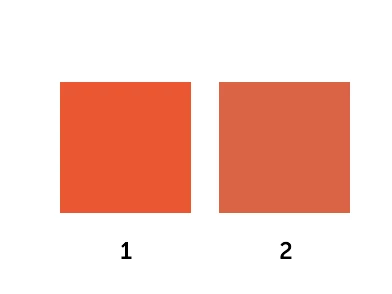
As you can see, when I pick up the color of the first square and assign it to the second square, the eyedropper clearly picks up the wrong color.

Any suggestion?
    This topic has been closed for replies.

    11 replies

    Participant
    September 16, 2016

    Hello,

    I was having this problem also almost for a year... So I just fix it with changing the option in the "Optimize" from PNG 32 Bit to PNG 24 Bit. If it helps.

    FW CS6 / Macbook Air - El Capitan

    Participant
    October 6, 2015

    I have a similar problem with Adobe FW CS5.5 since updating Yosemite to El Capitan. The eye dropper does not work at all now, but always picks 000000 = Black.

    Herbert2001
    Inspiring
    October 6, 2015

    More and more compatibility issues keep popping up on Macs now, unfortunately.

    Things will only get worse, since FW's development was halted in May 2013.

    Participant
    November 24, 2015

    I have the same problem with Fireworks CS5 on Mac OS El Capitain....

    rouv
    Participant
    September 16, 2015

    Hi everyone,

    Sooooo this is one year later, but I have found a solution that just worked! If your colour picker is picking the colour too dark, try this:

    1. Choose your eye-dropper/colour picker

    2. Click on the dropdown next to the tool icon

    3. Click RESET TOOL

    This just worked for me.

    Hope it helps you guys!

    Kind regards

    Herbert2001
    Inspiring
    September 16, 2015

    You are not talking about Fireworks, are you? That is a Photoshop screenshot. It will not work in Fireworks.

    Participating Frequently
    September 19, 2014

    This bug showed up in CS6 and happens when you activate the eyedropper by clicking on the color. If you use the actual eye dropper tool by clicking on it first, it does not happen. The drawback to this is that by clicking on the color box to activate the eyedropper, you used to be able to pull colors from off canvas. That is not the case if you click the eyedropper tool first. Adobe is breaking a lot of efficiencies. It's a bummer.

    doanminhman
    Participant
    September 9, 2014

    Hey i have the same problem! Here is the way I've heard from my friend:

    First, switch to eyedrop tool (press i - for shortcut).

    Then right click to select "point sample" to set the selection exactly on the area you clicked.

    It works for me, and I hope it also does for you.

    Goodluck!

    Participant
    October 2, 2012

    Interesting discussion happening here, and I ran with some of it myself. Here's what's working at the moment:

    Go to system preferences > display

    Choose the color tab.

    Change from "Thunderbolt Display" (or whatever it's defaulted to) and choose "sRGB IEC61966-2.1"

    Close it and reopen fireworks.

    Seemed to work for me, I hope it works for others. And I hope Adobe shows some more support for great products like Fireworks.

    groove25
    Inspiring
    October 2, 2012

    @varloodesign: Another user suggested this previously—karlapudis in reply #20—in response to a Flash forum posting that recommended Adobe RGB (1998).

    I could imagine how setting your display profile to sRGB IEC61966-2.1 might work to sidestep the color management problem within Fireworks, but doesn't it cause a noticeable shift in your display's color output? (On my computer, it creates a very chilling, ghostly blue color cast.)

    You can use Mac's ColorSync utility to compare the color spaces of your monitor profile (e.g. Thunderbolt display) and sRGB IEC61966-2.1. (Within the "Lab plot" graphic, there's an option to "Hold for comparison".) For example, my Color LCD display profile is significantly smaller than sRGB IEC61966-2.1:

    To me, this indicates that my LCD monitor is not capabable of rendering all the colors in sRGB IEC61966-2.1 (even though it's a fairly modest color space). Therefore, I wouldn't feel comfortable using that profile to describe my monitor. It would be trading one problem for another.

    Participant
    September 28, 2012

    Actually, for me this even happen when I open a file. I have a psd from a client that, when I open it in Fireworks side by side with opening it in Photoshop, the colors are different. If I pick colors from the psd, they appear in FW as they appear in the file when I open it in FW. Also, screenshots "change color" when I open or paste them in Fireworks...

    Participating Frequently
    September 28, 2012

    Are you converting the file to RGB before importing to Fireworks?

    groove25
    Inspiring
    September 11, 2012

    Incidentally, in Fireworks, the Paste Attributes command might serve as a workaround to this problem in some situations (e.g., in the example at the start of this discussion).

    groove25
    Inspiring
    September 8, 2012

    To see how color management might explain the shift from Color 1 to Color 2 in your graphic, consider the following experiment.

    Your original screenshot uses the icc profile "Color LCD", which is your monitor's display profile. This is a small-gamut color space and requires no actual color management because the image and the display occupy the same color space.

    According to my online source, untagged images within Mac OS 10.8 are treated as if they have an sRGB profile, so I'm going to change the attached profile of the image to "sRGB IEC61966-2.1"—as if it were an untagged image. I want to preserve the image appearance, though, so I'll use Photoshop's Convert to Profile, which also adjusts the numerical data contained within the PNG file.

    The image looks the same, but the color space in which its defined is now larger because it's in sRGB IEC61966-2.1 instead of Color LCD.

    NOTE: The graphic previews in this forum to do not include icc profiles, and some browsers do not support color management. Therefore, to normalize the appearance of all the images in this post, I reconverted the above image to Color LCD.

    Now I'm going to pretend that the image is untagged or tagged incorrectly and assign it the original Color LCD display profile. Remember, the image's numerical values were changed previously, so even though I'm simply attaching a color profile here, it's not going to look the same.

    As you can see, the colors have become significantly duller. Color 1 in this graphic now strongly resembles Color 2 in the original graphic.

    I don't know whether (or how) this experiment corresponds to what's happening in Fireworks CS6 in Mac's Mountain Lion OS, but somewhere in the process of sampling color with the eyedropper tool and applying that color to an object, it's possible that a color translation like the above might be occurring.

    Participating Frequently
    September 8, 2012

    Wow, this is a really deep answer. However I don't understand why in Fireworks CS5 (always on Mountain Lion) the Eyedropper works properly.

    Doesn't it mean that this is a "bug" in Fireworks CS6?

    groove25
    Inspiring
    September 8, 2012

    Yeah, the above was just speculation on my part. I am surprised that Fireworks CS5 does not suffer from the same problem though. Then again, Fireworks CS6 introduced a new Swatches/Color Picker arrangement, plus support for RGBa and Fill/Stroke transparency, so perhaps there's a connection there. I really don't know.

    In any case, it sounds like a bug in Fireworks CS6. So I'd encourage you to submit a bug report to Adobe:

    https://www.adobe.com/cfusion/mmform/index.cfm?name=wishform

    Linda Nicholls
    Participating Frequently
    September 8, 2012

    Make sure that Snap to Web Safe is turned off.

    groove25
    Inspiring
    September 8, 2012

    Wow! They may have gotten rid of "Snap to Web Safe" in Fireworks CS6. I do not see it in the Color Picker or in the Swatches panel fly-out menu.

    Linda Nicholls
    Participating Frequently
    September 8, 2012

    They must have gotten rid of it. I don't have FW CS6 yet.
