



chris.campbell
Community Manager
Community Manager
June 21, 2011
Question

ActiveX Filtering in Internet Explorer

  • June 21, 2011
  • 11 replies
  • 2424126 views

If you have completed the steps in our Enabling Flash Player in Internet Explorer 9 FAQ and continue to have problems seeing Flash content, please see the following video and instructions to learn how to disable ActiveX Filtering.

Please click here for an HTML5 version of this video: YouTube HTML5 HD Link

Internet Explorer and ActiveX Filtering

ActiveX Filtering is a feature introduced in Internet Explorer 9 which allows you to browse the Web without running any ActiveX controls.  Flash Player is an ActiveX control and when filtering is enabled Flash content will not be displayed on a webpage.

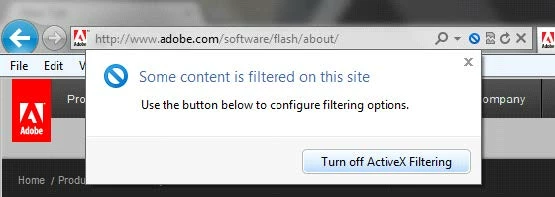
When you visit a webpage that contains ActiveX controls, and filtering is enabled, IE will display a "circle with slash" icon (see screenshot below) in the address bar to indicate that controls have been filtered.

Flash content and video will not be displayed on the page until you have disabled ActiveX filtering.  Fortunately, you have a few options for enabling ActiveX content.

Disable ActiveX Filtering for all websites

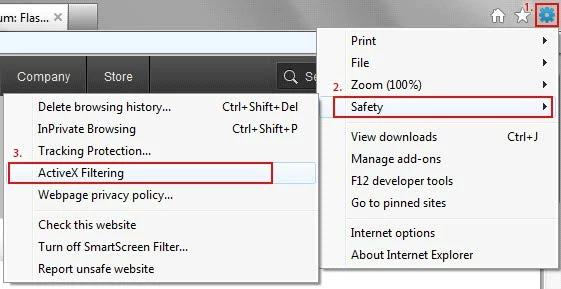
  1. Open Internet Explorer and click on the gears icon in the upper right corner of the window.
  2. Select the Safety Menu, and then uncheck the ActiveX Filtering menu item.
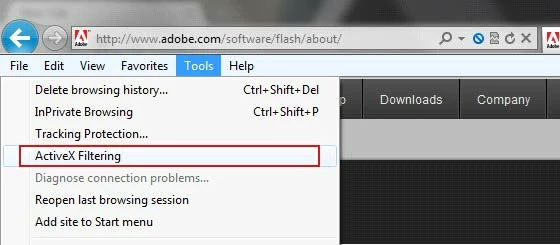
Alternately you can also access this via the Tools menu on the menu bar, then unchecking ActiveX Filtering.
Disable ActiveX Filtering for individual websites that you trust

  1. Navigate to a page with blocked content, noted with the circle with slash icon.
  2. Click the circle with slash icon
  3. Click the "Turn off ActiveX Filtering" button
This topic has been closed for replies.

11 replies

toumany keita
Participant
May 16, 2020

je souhaite essayer votre produit qu'on ma dit biens de choses sur lui

Participant
November 15, 2019

Thank you


Participant
September 7, 2011

Me too. Thanks a million, Chris. Without you, I would go crazy pulling my hair off.

I tried everything I possible could, you name it, I did it, but I was kept advised to download

and install the latest flash version. The next step I would try to uninstall IE9 and re-install IE8,

because I did not have such an issue when I was using IE8. If this fails, I would even try to

buy a new computer. Finally, I came across this forum and find your answer.

I follow your instructions, and finally I DID IT. I can see all videos now.

Many many thanks to you Chris. You save me a lot of work and money.

September 2, 2011

May I ask you to take me through the steps to disable ActiveX Filterning in IE8?

Thanks much

Participant
August 25, 2011

I have been experiencing the same Adobe Flash issues, however, with IE8

for over one week and was going insane trying to find a solution.  Thanks a million, Chris,

your recommendation worked for me.  I am definitely grateful.  You are awesome!!!

September 2, 2011

Could you please tell me how you did it for IE8?

Thanks

Participant
September 2, 2011

FIX =

Goto Tools (in IE8), Security, Trusted Sites, Custom Level, under Active X Controls and Plug-Ins – Automatic prompting for ActiveX Controls = must be Disabled

Date: Fri, 2 Sep 2011 07:14:11 -0600

From: forums@adobe.com

To: cec232cec@hotmail.com

Subject: ActiveX Filtering in Internet Explorer 9

Could you please tell me how you did it for IE8?

Thanks

>

Participant
August 23, 2011

thank you for figuring this out Chris :-)

August 17, 2011

Chris for President!  The Flash Player revision 10.3... shut down video capability overnight on my 1-year old expen$ive HP.  After preening various forums and considering suicide, I found Chris and he zeroed me in on 4 possibilities.  It was the !#$#! ActiveX Filtering.  Zip!  Back in business.  Chris is a credit to the fine company of Adobe Systems and a great help four those of us with deer-in-the-headlights syndrome.  Can't thank Chris enough!  

Participant
August 16, 2011

Chris, I am still having the problem wuth IE9  that the video says I need to install Flash player, I download it and still  get the same statement that I need to download flashplayer.  I did ensure  ActiveXfiltering is off.  Expasperating....

Thanks,   Mike

Sorry just found out that the add-on was disabled  duh,,, enabled and its now working

Mike

Participant
August 12, 2011

Thanks heaps Chris!!! I was beating my head as well on how to enable flash player in IE9. Thanks to your simple and illustrative guide, it was so easy to work it out. Thanks once again for this tremendous help.

Participant
July 22, 2011

THANK YOU CHRIS!!!!  I have been beating my head against the wall for days trying to figure this Flash thing out.  I've gone through all the troubleshooting, read all the forum entries, just about ready to give up completely when I found this thread.  I did it - it worked - I'm now a happy camper (well, except for the bruised forehead.  Thanks again.