


cwsc94870102
Participating Frequently
August 24, 2015
Answered

Failed to Register when installing Flash Player

  • August 24, 2015
  • 2 replies
  • 7111 views

Hello,

     I am having the following issue.  When trying to install the most current "Flash Player"  I get the following on all 300 Plus of my Windows 7 PCs.
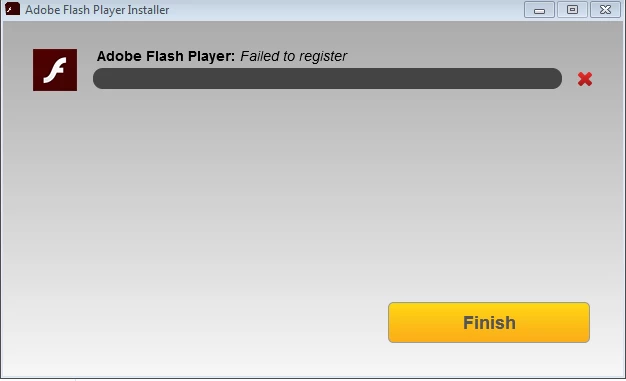
I have tried the steps for the clean installed and the steps for giving permissions to the correct Keys in the registry and nothing has worked.  I have attached the log files from the latest machine I have encountered the error on.  Can someone please help! I am at my wits end on this.

Shared Files - Acrobat.com

Thanks,

Roger Desilets

Charleston Water System

Message was edited by: Roger Desilets

This topic has been closed for replies.
Correct answer _maria_

Hi Roger,

Sorry, not sure what happened there with your forum post.  I didn't get an email that you replied until now (two came through).

I'll message you Monday morning when I arrive and see if you're available then.

--

Maria


For anyone who may come across this thread with similar issue (and still getting 'Failed to Register' error after running the SubInACL tool to fix permissions):

We're identified the issue as McAfee. Specifically, McAfee was preventing access to the following registry entries:

HKLM\SOFTWARE\Microsoft\Internet Explorer\ActiveX Compatibility\{D27CDB70-AE6D-11cf-96B8-444553540000}\Compatibility Flags

HKLM\SOFTWARE\Microsoft\Internet Explorer\Low Rights\ElevationPolicy\{FAF199D2-BFA7-4394-A4DE-044A08E59B32}\Policy

HKLM\SOFTWARE\Microsoft\Internet Explorer\Low Rights\ElevationPolicy\{FAF199D2-BFA7-4394-A4DE-044A08E59B32}\AppPath

HKLM\SOFTWARE\Microsoft\Internet Explorer\Low Rights\ElevationPolicy\{FAF199D2-BFA7-4394-A4DE-044A08E59B32}\AppName

When McAfee was uninstalled, Flash Player ActiveX registered.  Could be some  policy setting in the McAfee configuration.  OP is going to investigate.

--

Maria

2 replies

cwsc94870102
Participating Frequently
August 28, 2015

m_vargas

Maria,

     I ran the SubInacl and created the new reset.cmd and rebooted.  I then tried the Flash player installer you downloaded to my desktop and received the same error message.

Thanks,

Roger

_maria_
Community Manager
Community Manager
August 28, 2015

Hi Roger,


Thank you for the update.  The installer engineer is still going through the Process Monitor log file.

--

Maria

_maria_
Community Manager
Community Manager
August 24, 2015
cwsc94870102
Participating Frequently
August 25, 2015

Hi Maria,

I have done this already, but tried it again just to make sure, and I got a new error.

This error and the one above are the 2 errors I am getting on all my computers.  Ever since Flash player 17 was released I have been getting the errors.  Is there a Microsoft update or another piece of software that may be causing this?

Thanks,

Roger

_maria_
Community Manager
Community Manager
August 25, 2015

Hi,

That should be the same error as the other one.  The first screenshot is of the online installer, while the second screenshot is of the standalone/offline installer. Messaging space is limited in the online installer, so the message is shorter.  I can confirm by viewing the updated FlashInstall.log file. 

This error essentially means there is a permissions error in the file system and/or registry and Flash Player is not able to register the OCX component.  Until the permissions are fixed, Flash Player will not be able to register.  The file that we have (reset_fp.cmd) resets permissions on all files/registry entries associated with Flash Player.


Can you please post a screenshot of the directory that contains SubInACL.exe and the reset_fp.cmd file?

--

Maria