


March 26, 2010
Question

cannot load Design mode flash builder 4 preminum trail version

  • March 26, 2010
  • 12 replies
  • 19579 views

Hi

I installed flash builder4 premium trail version .After creating project when i click on the design mode . It displays an alert box containg the message like cannot load design mode with title as outof memory . How can slove this problem.

Here i  attached the image file.
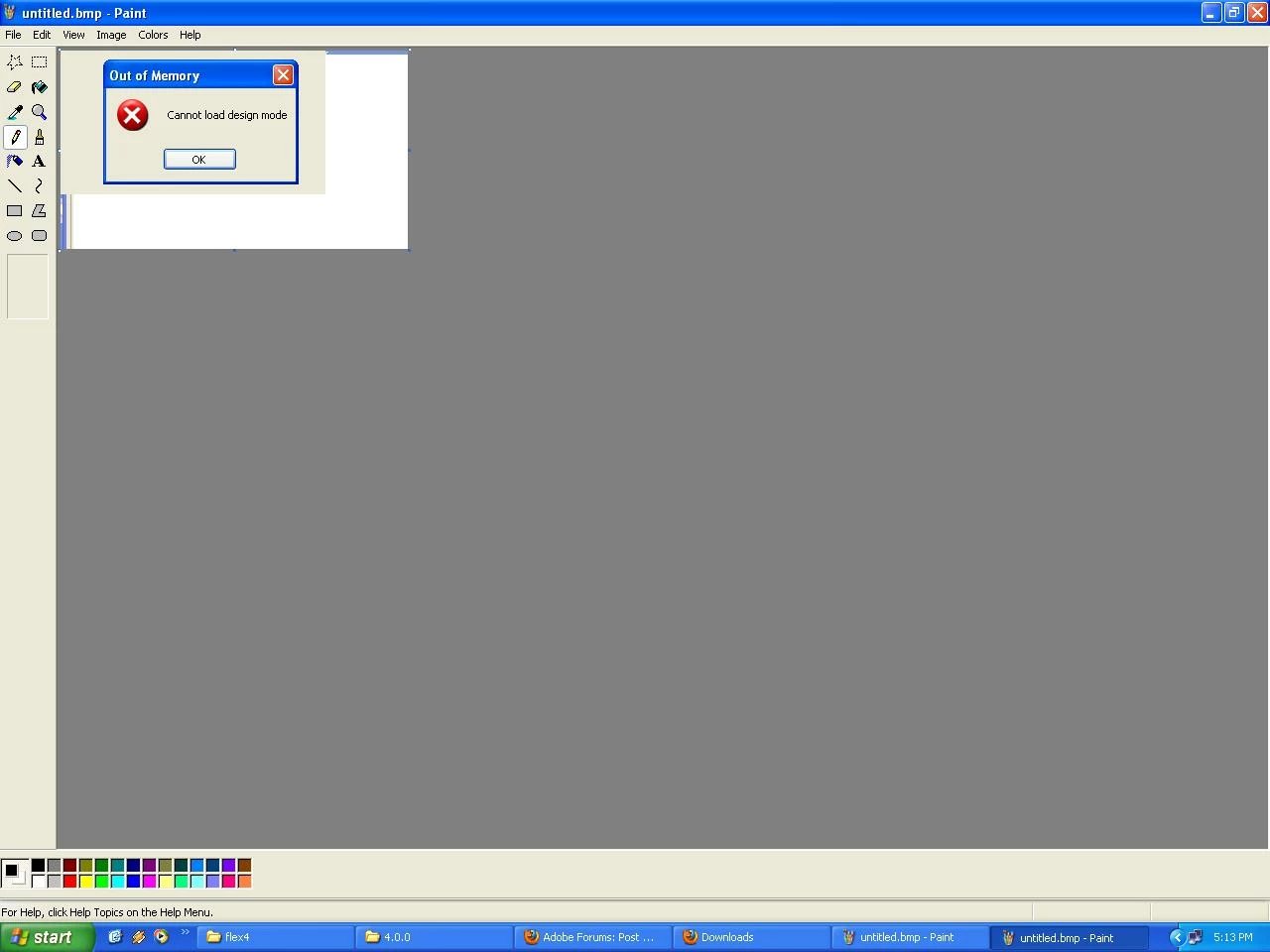
Thanks in advance

Regards

---------

ss

    This topic has been closed for replies.

    12 replies

    Participant
    January 3, 2012

    I downloaded the Flashbuilder for Force.com and got the same error...design mode wouldn't load. After reading the posts above I looked here...c:\Program Files (x86)\Common Files\Adobe\APE\...and did not see a folder named 3.1 but there was one named 3.101. I made a copy and named it 3.1 and now design mode shows up.

    May 2, 2010

    Here's what I did to get things workign for CS5 and Flashbuilder:

    1. Open up notepad.
    2. Paste [Windows Registry Editor Version 5.00

      [HKEY_LOCAL_MACHINE\SYSTEM\CurrentControlSet\Control\SafeBoot\Minimal\MSIServer]
      @="Service"
    3. Save that as MSIService.reg
    4. Open that and merge it into your registry.
    5. Open a command prompt as administrator.
    6. Type net user administrator /active:yes
    7. Boot into safemode, login as Administrator (not your user name wiht Administrator permissions)
    8. Make sure before you do the following steps you open a command promt and type "net start MSIService
    9. Install all of the microsfot services in the deploy directory.
    10. If any of them give you any errors check the errors for components/random string/randomstring
    11. Find the first number in your string, browse to it and locate the 2nd number listed witin that string
    12. Delete the substring
    13. Try instaling the MS file again it should work.
    14. Once all of your MS files are installed run the Adobe setup again.

    Known Participant
    April 29, 2010

    I try reinstall plugin for solving this problem.

    1. Deactivate Flash Builder

    2. Install plugin again

    3. Start eclipse and now don't work anything!

    Please, help

    Adobe Employee
    April 29, 2010

    Hi Dmitry,

    Do you mean that activation is no longer working after reinstall? Could you elaborate what is not working for you?

    Thank you!

    -Yukari

    Known Participant
    April 30, 2010

    Yes, now after reinstall don't work flash builder plugin in my eclipse Galileo.

    But i try run the eclipse Ganymede that installed with plugin - and there all is working.

    Now i use it. But all my plugins and some settings i lost.

    Participant
    April 18, 2010

    I also experienced the bug by installing the Eclipse Plugin of FB (v4.0 - build 272416).

    Solution was found by first installing the stand-alone version, uninstalling this version and installing the Eclipse plugin version of FB 4.0. To make life easier I placed the missing DLL files from '\Program Files\Common Files\Adobe\APE\3.1' (for Windows) in a zipped file on http://www.respua.nl/APE.zip. In brief, place these files in the mentioned directory and I expect your problems to be gone.

    David J.
    Inspiring
    April 19, 2010

    Thanks William!

    This worked for me. I downloaded the APE zip file and placed it in the DrivePath:/Program Files/Common Files/Adobe/

    Hardware:

    Intel Core 2 Quad Q6600

    6GB RAM

    ATI HD4850

    Software:

    Windows Vista 64bit Ultimate

    Flash Builder 4 Premium (Downloaded April 4th)

    Eclipse Galileo


    Previously installed software:

    Flex Builder 3 (I had uninstalled this, before installing the plugin)

    Flash Builder 4 Beta (I had uninstalled this, before installing the plugin)

    Eclipse Ganymede

    David

    Participant
    April 18, 2010

    I just downloaded the trial version onto my Mac OS X and am getting the same error.  It appears as though Adobe is working on a fix when looking at the Jira ticket.  Is there an ETA on getting this patch out?

    Thanks,

    C

    Known Participant
    April 14, 2010

    The same problem.

    Mac OS X

    Flash Builder plugin trial

    eclipse.ini

    -startup
    ../../../plugins/org.eclipse.equinox.launcher_1.0.201.R35x_v20090715.jar
    --launcher.library
    ../../../plugins/org.eclipse.equinox.launcher.carbon.macosx_1.0.200.v20090520-1835
    -showsplash
    org.eclipse.platform
    --launcher.XXMaxPermSize
    512m
    -vmargs
    -Xms512m
    -Xmx1024m
    -Xdock:icon=../Resources/Eclipse.icns
    -XstartOnFirstThread
    -Dorg.eclipse.swt.internal.carbon.smallFonts

    Jason San Jose
    Adobe Employee
    Adobe Employee
    April 14, 2010

    Hi all, please continue to watch this bug http://bugs.adobe.com/jira/browse/FB-25594 and post your details there.

    Since we've narrowed it down to a missing installed component, it would be helpful to get installer logs attached to the bug.

    Win: C:\Program Files (x86)\Common Files\Adobe\Installers\Adobe Flash Builder Plug-in <date>/log.gz

    Mac: /Library/Logs/Adobe/Installers/Adobe Flash Builder Plug-in <date>/log.gz

    It would also be helpful to know what prior Adobe Flash products you had installed just in case. For example, prior Flex Builder versions or Flash Builder betas, Flash CS4, etc.

    Again, use the bug link above. The bug database is more forgiving when it comes to file attachments.

    Jason San Jose

    Software Engineer, Flash Builder

    April 18, 2010

    Sorry for the double post (same post on another thread) but this worked for me.

    I think I have a solution since I had this same problem. I know this is  going to sound a bit weird but it worked for me.  I went into my install  directory on the desktop where everything was extracted, and then into  the payloads directory.  From there I went into each Microsoft  directory, went to each individual MSI file and ran it and then selected  repair.  After this, I right clicked each MSI file and clicked  uninstall.  I then ran the Flash Builder installer and was able to  install with no problems and not only did the standalone work, but my  plugin installation started working again as well. I have no more problems with design mode.

    Participating Frequently
    April 13, 2010

    I have the same problem with the plug-in version of Flash Builder. I have been unable to use design view since we moved to flash builder - though other people working with me do not have this problem! hmm...

    Adobe Employee
    April 7, 2010

    Hi all,

    This Design mode out of memory error could occur when there is an issue with installation of internal player that is used to display Design view.  Could you check the following path if files exist?

    \Program Files\Common Files\Adobe\APE\3.1

    or

    \Program Files (x86)\Common Files\Adobe\APE\3.1

    Thank you,

    -Yukari

    Participating Frequently
    April 8, 2010

    I can't have this file:\Program Files\Common Files\Adobe\APE\3.1, what can I do?

    Known Participant
    April 9, 2010

    As I reported, I installed the standalone FB4 version and my plugin version started working in design mode. Well, I have had some quite horrible crashing leading me to think that the two are a bit like Angelina and Brad.

    I have copied the APE directory and contents to a safe location and uninstalled the standalone FB4 and my old FB3. FYI the uninstaller removed the APE folder in the Common Files/Adobe folder which is not great as I would think that a common file might mean just that. I copied back the APE folder and started up the FB4 plugin version again. This seems to work fine now. I haven't even rebooted yet fingers crossed

    I do not know if these issues are widespread, but to remind y'all I am using:

    Vista 32 (fully updated and service packed)

    4GB Ram

    Build 272416

    Participating Frequently
    April 7, 2010

    My version is downloaded in https://www.developerforce.com/events/flashbuilder/shortform.php?d=70130000000F2CW

    ,and My eclipse.ini is like this:

    -nl
    en_US
    org.eclipse.platform
    --launcher.XXMaxPermSize
    512M
    -vmargs
    -Dosgi.requiredJavaVersion=1.5
    -Xms512m
    -Xmx512m

    I also had the same problem, and every time I required to refresh the "Data Set" under the "Offline Briefcase Configuration" in salesforce.com before I ran it.If I didn't refresh it, It will occur the error like this

    Jason San Jose
    Adobe Employee
    Adobe Employee
    April 7, 2010

    ypeng, that runtime error screen shot doesn't appear to be related to design view. Looks like something from SalesForce.com. Please start a separate thread.

    Jason San Jose

    Software Engineer, Flash Builder

    Participating Frequently
    April 8, 2010

    Hi Jason,

         Thanks very much for paying attentions on my questions, and I want to know that you said ask me to  start a separate thread, how can I do?Thanks very much.

    Participant
    April 3, 2010

    I am likewise having this problem, only with the release version of the FB4 plugin for eclipse.  I'm running it in eclipse, and can create actionscript projects with no problem.  WHen I try to create an MXML project, the project gets created and then I'm presented with a popup with the title "Out of Memory" and the content "Cannot load design mode";  I can see all the mxml code in the code view, but the design view obviously won't initialize.

    I'm currently downloading the full Flash Builder 4 application but would prefer to be able to use it as a plugin in eclipse.

    Thank you