Community Expert
January 3, 2025
Question

2 really stupid questions...

  • January 3, 2025
  • 3 replies
  • 796 views

I am getting all confused about some really simple things right now...

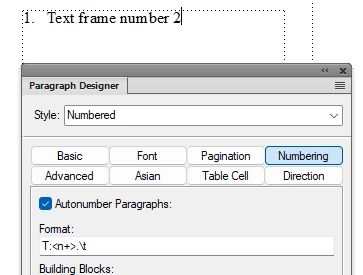
1: If I make two separate text frames in a document and apply a numbered paragraph style in each frame

 like this:
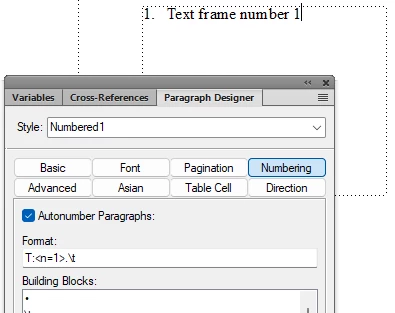
 

... Should I not expect FrameMakers paragraph numbering to work across these two loose text frames?  Should FrameMaker not be using the counter in paragraph style?... 


2: When I import styles between document using the command File->Import Formats-> I would not expect FrameMaker to import column layouts under "Document Properties". But that is what it does - but has FrameMaker ALWAYS done that?


    3 replies

    Barb Binder
    Community Expert
    Community Expert
    January 6, 2025

    Hi Bjørn:


    Well, that makes sense to me because we can only have one paper size in a FrameMaker document and since USLetter is so much smaller than B5, the footer is cropped off.  (As is the right side of the header and template frame.) All three are still there, the footer is just out of site. I can see it when I select the three frames and drag them up, though I can't manipulate it unless I delete or move the header frame down first and then pull the remaining two up. More new information for me: we can pull template frames off the page, but FrameMaker disallows dragging background frames out off the page. It's allowed to, but we aren't! 


    But yes, templates!! 😊


    And, two good questions.


    ~Barb

    ~Barb at Rocky Mountain Training
    Barb Binder
    Community Expert
    Community Expert
    January 5, 2025

    Hi Bjørn :


    I'm late to this conversation... but it clarified something that has baffled me for years. 


    I work with sideheads regularly, and when I create a generated file in a sidehead book, the sidehead appears on the master page of the generated files but not the body pages based on the same master. This has been going on for years, and I just hop over to the master, enable room for sideheads in Customize Layout > Customize Text Frame (the numbers are there but it's not enabled), head back to the body pages and continue along my merry way. 


    After your question, I played with it: the sidehead is imported/assigned correctly when I import just Document Properties, but it behaves the same way I described above when I import just Page Layouts. As you said, this makes no sense because it's a command found within Column Layout, applied to the Flow tag. The other column commands are imported with Page Layouts.


    Did you locate a long-standing bug? Was the the intent of the early developers? No idea, but you are absolutely correct is is imported with Document Properties. So weird.


    I think you already have the answer on the numbers: the rule to memorize is that the counter is set to 0 for each flow. 


    ~Barb

    ~Barb at Rocky Mountain Training
    Community Expert
    January 6, 2025

    Thanks @Barb Binder I think this "issue" is probably rooted in reasoning regarding the connection between the need for assigning a specific paragraph property i order to make the sidehead layout work. Probably... :-))

    ... and maybe it works as the same "logic" that applies when you change page size in the "wrong" order. Try this:

    1. Create new document
    2. Change Page Size to B5
    3. Change Pagination to Double Sided
    4. Check Master Pages. Left Master Page now has a column matching US Letter while Right Master Page is B5
    5. Now go to Column Layout and ask to Update Entire Flow, Now you will have two page flows in B5. But the Footer will have disappeared outside of reach and the Header will still be US Letter. Silliness abundant 🙂 But fortunately we have a template for that 😉
    Bjørn Smalbro - FrameMaker.dk
    frameexpert
    Community Expert
    Community Expert
    January 3, 2025

    Hi Bjørn, The numbering will only continue if the text frames are connected.

    I wouldn't have expected what you are seeing with item 2 either. I am not sure if that is something new or if it's always been like that.

    Bob_Niland
    Community Expert
    Community Expert
    January 4, 2025

    Top two suspects:
    a. Frames not connected.
    b. Frames are connected, but format "Numbered1" is applied to both.


    Insofar as Import, I'd need to run some experiments to see which of:
    ☐ Page Layouts or

    ☐ Document Properties
    pulls in Master Pages (assuming that unusual 2-col is on an MP at the source). I'm guessing that regular 2-col doesn't work for the document.

    Community Expert
    January 4, 2025

    Thank @Bob_Niland . Yes, frames must be connected and, having looked at an older Frame version it apparently always been so.

    The Page Layout/Document Properties is a bit of an issue, if real. It puts a hole in the template system.

    Bjørn Smalbro - FrameMaker.dk