
Inspiring
February 21, 2026
Answered

about auto numbering

  • February 21, 2026
  • 1 reply
  • 34 views

Hello,

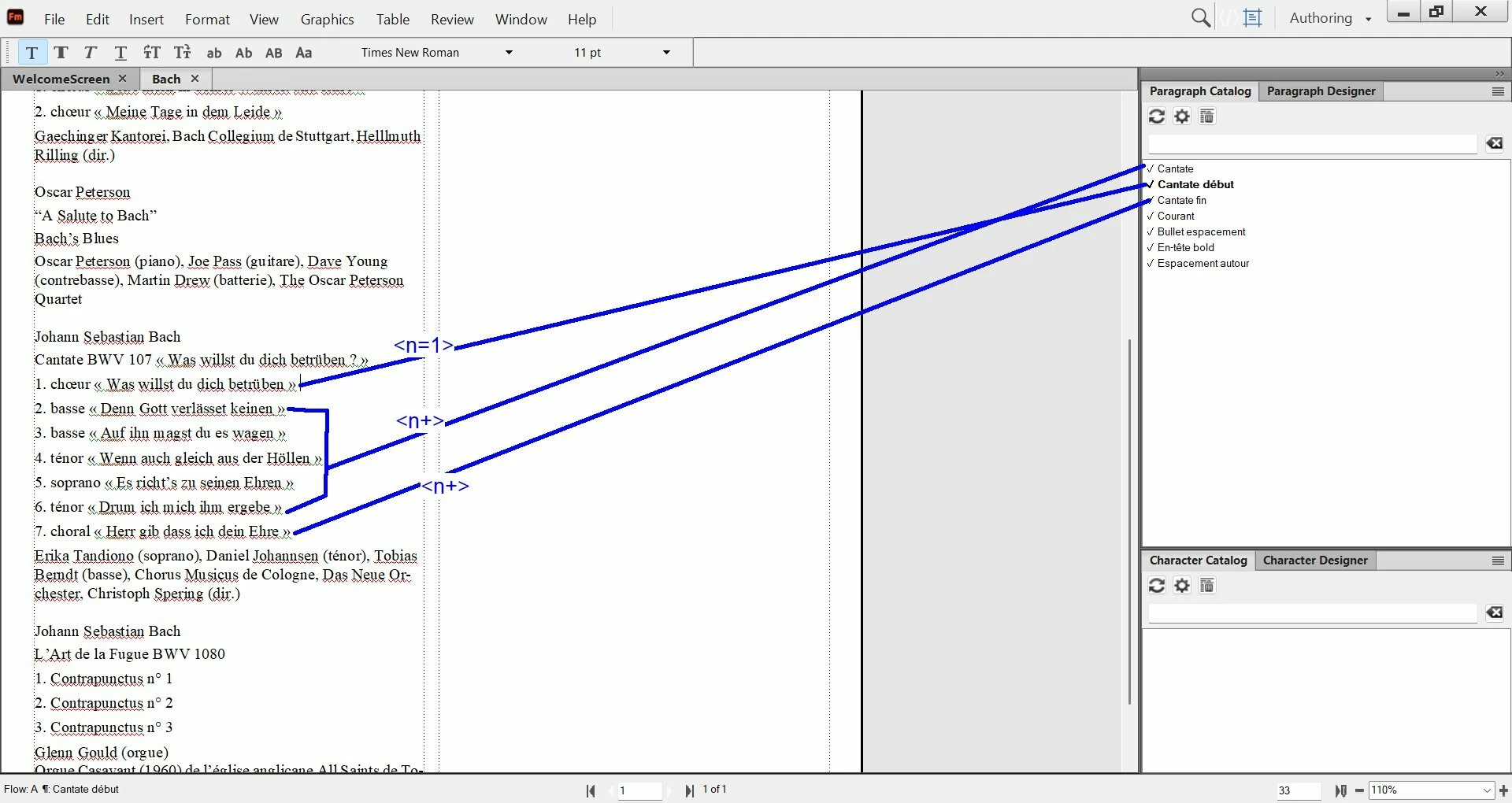
For this FM file (see screenshot), I have set the paragraph designer /Numbering like this : 

→ “cantate début”  : <n=1>

→ “cantate”  : <n+>

→ “cantate fin” : <n+>

So, for the “Cantate BWV 107” in the screenshot, the auto numbering goes from 1 to 7.

Is it good to do it like this ? Have you some advises to give me ?


    Correct answer Bob_Niland

    Why do you need a separate final (Cantate fin)?

    The usual case is that there is an initial (¶Cantate début), as you have, and it declares
    Basic: ☑Next Paragraph Tag: [Cantate]
    Numbering: ☑Autonumber…  Format: [‹n=1›.\t  ]
    and the ¶Cantate format has:
    Basic: ☑Next Paragraph Tag: [Cantate]

    Numbering: ☑Autonumber…  Format: [‹n+›.\t  ]

    There is usually no need for a separate final format, unless some special pagination, keeps or space-below is required, and if so, it has to be manually- (or script-) applied, because FM has no way to know that it’s the final.

    … or I’m not understanding the question.

    1 reply

    Bob_Niland
    Community Expert
    Bob_NilandCommunity ExpertCorrect answer
    Community Expert
    February 21, 2026

    Why do you need a separate final (Cantate fin)?

    The usual case is that there is an initial (¶Cantate début), as you have, and it declares
    Basic: ☑Next Paragraph Tag: [Cantate]
    Numbering: ☑Autonumber…  Format: [‹n=1›.\t  ]
    and the ¶Cantate format has:
    Basic: ☑Next Paragraph Tag: [Cantate]

    Numbering: ☑Autonumber…  Format: [‹n+›.\t  ]

    There is usually no need for a separate final format, unless some special pagination, keeps or space-below is required, and if so, it has to be manually- (or script-) applied, because FM has no way to know that it’s the final.

    … or I’m not understanding the question.

    Inspiring
    February 21, 2026

    Hi ​@Bob_Niland 

    First, I have listened to your advise and deleted the separate final format (“cantate fin”), because it was using the same space below as for “cantate”, ie 4 pt).


    Here are my settings now : is it good according to you ?


    About the space between “Cantate BWV 107 « Was willst du dich betrüben ? »”   and   “chœur « Was willst du dich betrüben »” : as “cantate 107” is set with 3 pt below, and “choeur” is set to 4 pt above, why we do not have a space of 3pt + 4 pt = 7 pt ?


    Actually “Basic/Next paragraph tag” is empty. Do I need to set the “next paragraph tag” ?  As the text after “Cantate” is “Body”, how to set next paragraph tag for Cantate ?


    Community Expert
    February 23, 2026

    @Bob_Niland 

    Yes, FrameMaker always uses the space between two paragraphs which is larger. It does not (like Word) use both spaces of the first and the following paragraph.

    FramMaker’s approach is far more reliable!

    This is also described in the online help:

    https://help.adobe.com/en_US/framemaker/using/index.html#t=using-framemaker%2FFrameMaker-2022%2Fuser-guide%2Ffrm_page_layout_pl-styles-indentation-alignment-spacing.html

    The help says: Specify values for Space Above and Space Below. The space between paragraphs is determined by the Space Below setting of the first paragraph or the Space Above setting of the second paragraph, whichever is larger.

    Best regards, Winfried