
Inspiring
August 8, 2025
Answered

about custom list in character catalog

  • August 8, 2025
  • 1 reply
  • 367 views

Hello,

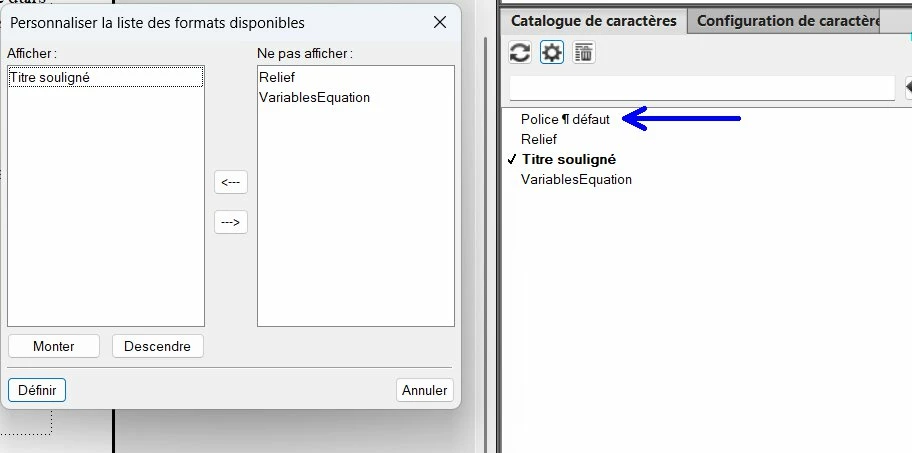
In FM 17.07, when I am in the character custom list, my goal is to display only :

— titre souligé

— police by default (default font)

But I see that I cannot select "police by default" in my custom list. Why ?
 

Correct answer frameexpert

You can apply the Default Para Font with a shortcut key: select the text and press Control+8 and the Character Catalog should pop up. Select the desired entry and press Enter.

1 reply

Two-fer
Inspiring
August 8, 2025

If I understand the question correctly....

[Update: I don't think the following is what is being asked, but....]

The "Default Font" selection merely changes a selected word, etc., that already has a Character tag setting back to the paragraph's default font, so it isn't assigning a special character tag and thus no checkmark is displayed. 

So if you have bolded a word in a sentence and you want to change it back to the standard paragraph font (bold-->bold), highlight the word and click on "Default Font"--the bolded word will be changed back to whatever the default paragraph font is. (Again, there will be no checkmark.) 


Inspiring
August 8, 2025

Hi,

To be more clear, here is a new screenshot of what I would like to do :


I would like to have "police defaut" (default font) in the custom list at left (in the column "afficher" (ie : "display")).  This custom list is corresponding to what I want to display in the character catalog.

But I see that I cannot do it with FM.

frameexpert
frameexpertCorrect answer
Community Expert
August 8, 2025

You can apply the Default Para Font with a shortcut key: select the text and press Control+8 and the Character Catalog should pop up. Select the desired entry and press Enter.
