
Known Participant
June 18, 2021
Answered

"Access Denied" when trying to edit Responsive HTML5 Publish Settings

  • June 18, 2021
  • 2 replies
  • 550 views

I am using FM2019 on Windows 10. 


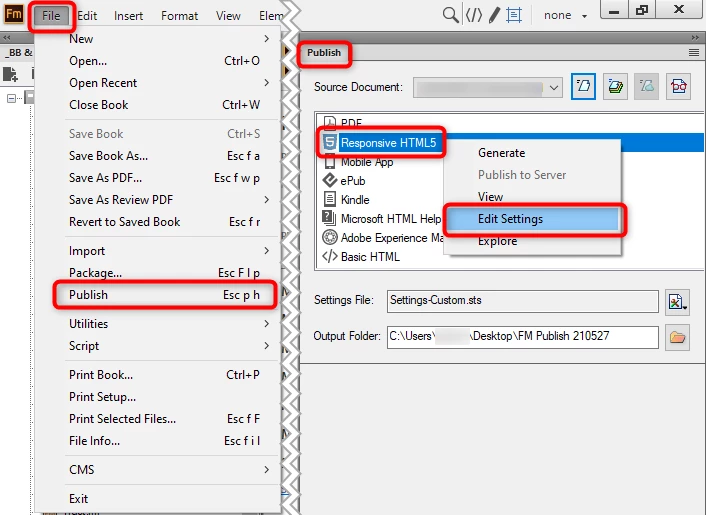
From FM, I am publishing to Responsive HTML5 in the FILE > PUBLISH menu.


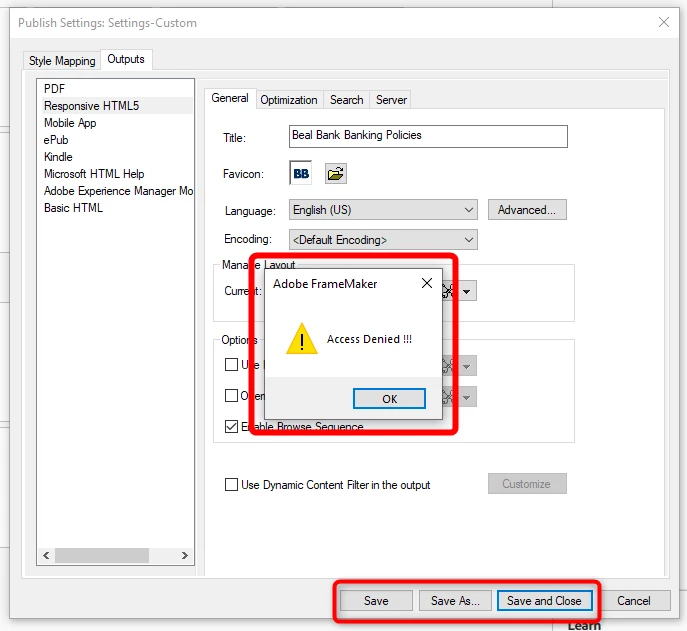
When I try to save / save as / save and close the settings, I get an "Access Denied" message.


I have admin rights on the machine and nothing has changed (so far as I know) between the last time I could edit the file and now that I cannot.


Any idea what is causing this and how I can fix it?

This topic has been closed for replies.
Correct answer Jeff_Coatsworth

That would be it! Suggestion: save your .sts files off in some "accessible" location that IT isn't likely to lock down on you 😁

2 replies

Jeff_Coatsworth
Community Expert
Jeff_CoatsworthCommunity ExpertCorrect answer
Community Expert
June 18, 2021

That would be it! Suggestion: save your .sts files off in some "accessible" location that IT isn't likely to lock down on you 😁

Bob_Niland
Community Expert
Community Expert
June 18, 2021

And give your .sts files sufficiently unique names, as FM doesn't necessarily default to using whatever might be in the same directory.

Jeff_Coatsworth
Community Expert
Community Expert
June 18, 2021

Where's that "Settings-Custom.sts" file located?

Known Participant
June 18, 2021

In the same folder as the settings.sts and the default.sts file: C:\Program Files\Adobe\Adobe FrameMaker 2019\fminit\Publisher


I haven't changed its location since before when I could edit the settings.


However . . . since you asked this, I double-checked and it seems like I no longer have permissions for this folder.  I've contacted my IT department to see if they can fix this for me.


Thank you for the (indirect) suggestion.  I'll update this Q&A if that turns out to be the answer to the problem.