K.Daube
Community Expert
Community Expert
September 15, 2022
Answered

Access keys do not work in palette

  • September 15, 2022
  • 1 reply
  • 199 views

Dear experts,

You know the access keys which are indicated in the label of a button or menu item by underline. For example, you press the Find button in the Find/Change panel by using Alt+f.

I have discovered that this mechanism does not work in ES palettes, but works correctly in ES dialogs.

You can test this with the following script by exchanging the window definition. Run it in ESTK with taget ESTK or in FM with the appropriate target definition.

I have not found any documentation about this, neither in the CC Javascipt Tools Guide, nor in the Adobe FrameMaker Scripting Guide. Even Peter Kahrel does not mention this 'feature' in his famous ScriptUI for Dummies.

→ Is this a bug or a known difference? Any documentation about this?

Dialog window

ALT+f presses the Fire button and you get a short note at the bottom of the window.

Palette window

Run in ESTK with  ALT+f opens the File menu of ESTK. When in FM the file menu of FM is opened.


main();
function main () {
var w  = new Window("dialog", "Test Button-behaviour.jsx", undefined);
//var w  = new Window("palette", "Test Button-behaviour.jsx", undefined);
  w.cb1 = w.add("checkbox", undefined, "First item in TAB sequence");
  w.t1 = w.add("statictext", undefined, "Use ALT+f to press the button:\ndialog:    correct function\npalette:   the File menu of the app is opened", { multiline: true});
  w.t1.preferredSize.width = 300;
  w.b1 = w.add("button", undefined, "&Fire this");
  w.t2 = w.add("statictext", undefined, "This shall receive a reaction …");

  w.b1.onClick = function () {
    w.t2.text = "You have just clicked";
  }
  w.show();
}


    This topic has been closed for replies.
    Correct answer K.Daube

    Following Peter Kahrel's documentation I first was not succesful in my real test. In the following dialog/palette you see a button with the accelerator key f. In the drop-down list I have items such as "four" and "five". I have an event handler for the quick access in the drop-down-list with type-ahead functionality.
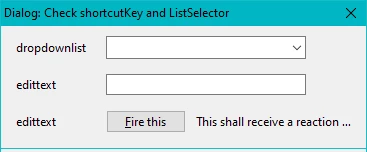
    Just doing what Peter suggests presses the button at the same time as I navigate in the dorp down to "four" - and I have no change to select "five", because focus is now on the button.

    I needed to add code In the main function to get things working as I intend:

    for UI element drop-down-list:

    ¹) KLD_Z.evBuffer = "": anyway required for function of ListSelector

    ¹) w.g3.b1.enabled = false; and

    ²) w.g1.dd.onChange … required to avoid firing button on selection of "f.."

    For the UI-element edit text

    I dot not use a shortcutKey, because the 'user-experience' is very strange with this.


    var KLD_Z = KLD_Z || {};                          // global script object
    KLD_Z.evBuffer = "";
    
    KLD_Z.ListSelector = function (oEvt) { // ==========================================
    var array, j=0, kName, kChar, kID, buffer;
      array  = oEvt.currentTarget.evParm;
      kName = oEvt.keyName.toLowerCase();
      if (kName == "down" || kName == "up") {return}
      if (kName == "enter"|| kName == "tab") {   // leave the navigation cycle
        if (sFunction = "") {return;}
        eval (sFunction);      // execute the desired function (SelectFindType etc)
        KLD_Z.evBuffer = "";
        return;
      }
      if (kName == "backspace") {
        KLD_Z.evBuffer = KLD_Z.evBuffer.replace (/.$/, "");
      } else {
        kID = oEvt.keyIdentifier;           // U+006D → m; U+00FC → ü; U+0068 → h
        kID = kID.substring  (2);           //   006D
        kChar = parseInt(kID, 16);          //    109         252         104
        kChar = String.fromCharCode(kChar); //      m           ü           h
        kChar = kChar.toLowerCase();
        KLD_Z.evBuffer += kChar;
        while (j < array.length-1 && array[j].toLowerCase().indexOf (KLD_Z.evBuffer) != 0) {++j;}
      }
      if (array[j].toLowerCase().indexOf (KLD_Z.evBuffer) == -1) {
        oEvt.currentTarget.selection = 0;
      } else {
        oEvt.currentTarget.selection = j;
      }
    } // --- end ListSelector ------------------------------------------------
    
    KLD_Z.main = function () { // <><><><><><><><><><><><><><><><><><><><><><>
    var asData, sText, w;
    
      asData = ["one", "two", "three", "four", "five", "six", "seven", "öfter", "selten", "gar nicht", "Étienne", "Ωmega"];
    
    //w  = new Window("dialog", "Dialog: Check shortcutKey and ListSelector", undefined);
      w  = new Window("palette", "Palette: Check shortcutKey and ListSelector", undefined);
      w.alignChildren = ['left','top'];
      w.t1 = w.add("statictext", undefined, sText, { multiline: true});
      w.t1.preferredSize = [300,105];
      w.g1 = w.add ("group", undefined, undefined);
      w.g1.t1 = w.g1.add ("statictext", undefined, "dropdownlist");
      w.g1.t1.preferredSize.width = 80;
      w.g1.dd =  w.g1.add ("dropdownlist", undefined, asData);
      w.g1.dd.preferredSize.width = 200;
      w.g1.dd.evParm = asData;
      w.g1.dd.addEventListener  ("keydown", KLD_Z.ListSelector);
      w.g1.dd.onActivate = function () {KLD_Z.evBuffer = "";
                           w.g3.b1.enabled = false} // ¹)
      w.g1.dd.onChange = function () {w.g3.b1.enabled = true}   // ²)
      w.g2 = w.add ("group", undefined, undefined);
      w.g2.t1 = w.g2.add ("statictext", undefined, "edittext");
      w.g2.t1.preferredSize.width = 80;
      w.g2.e1 = w.g2.add("edittext", undefined, undefined);
      w.g2.e1.preferredSize.width = 200;
    //w.e1.shortcutKey = "e";     // Its irritating to use this
      w.g3 = w.add ("group", undefined, undefined);
      w.g3.t1 = w.g3.add ("statictext", undefined, "edittext");
      w.g3.t1.preferredSize.width = 80;
      w.g3.b1 = w.g3.add("button", undefined, "&Fire this");
      w.g3.b1.shortcutKey = "f";      // required in palette !
      w.g3.t1 = w.g3.add("statictext", undefined, "Receives button reaction …");
      w.g3.b1.onClick = function () {
       w.g3.t1.text = "Fire button clicked! ";
      }
      w.show();
    } //--- end main ----------------------------------------------------------
    
    KLD_Z.main ();


    Now, when the script is run,

    Type TABs to enter or leave dropdown

    • Type ahead in the dropdown to select;
    • BS to remove previous char entry
    • Up/down keys may be used further
    • TAB or ENTER to confirm selection.

    Type TABs to enter the edit field and leave it.
    Type f to press the button.

    → for my real project FMfindRepl with many more UI elements there might be more work ahead...

     

    1 reply

    K.Daube
    Community Expert
    K.DaubeCommunity ExpertAuthor
    Community Expert
    September 15, 2022

    Well, I have found, that terminology is my problem here...

    Peter Kharel explains the use of the UI element property shortcutKey, which must be used in addition to the & notatation in the label:


    var w = new Window ("dialog");
    var grp = w.add("group");
    var st = grp.add("statictext", undefined, "&Name:");
    var txt = grp.add("edittext"); txt.shortcutKey = "n";
    var c1 = w.add ("checkbox", undefined, "&Check 1"); c1.shortcutKey = "c";
    var c2 = w.add ("checkbox", undefined, "C&heck 1"); c2.shortcutKey = "h";
    var r1 = w.add ("radiobutton", undefined, "&Radio 1"); r1.shortcutKey = "r";
    var r2 = w.add ("radiobutton", undefined, "R&adio 1"); r2.shortcutKey = "a";


    But I'm puzzled also with this information: why this suff is not needed for the function in a dialog window?

    ... and i need to figure out how to specify this in the XML files with the localised texts.

    K.Daube
    Community Expert
    K.DaubeCommunity ExpertAuthorCorrect answer
    Community Expert
    September 16, 2022

    Following Peter Kahrel's documentation I first was not succesful in my real test. In the following dialog/palette you see a button with the accelerator key f. In the drop-down list I have items such as "four" and "five". I have an event handler for the quick access in the drop-down-list with type-ahead functionality.

    Just doing what Peter suggests presses the button at the same time as I navigate in the dorp down to "four" - and I have no change to select "five", because focus is now on the button.

    I needed to add code In the main function to get things working as I intend:

    for UI element drop-down-list:

    ¹) KLD_Z.evBuffer = "": anyway required for function of ListSelector

    ¹) w.g3.b1.enabled = false; and

    ²) w.g1.dd.onChange … required to avoid firing button on selection of "f.."

    For the UI-element edit text

    I dot not use a shortcutKey, because the 'user-experience' is very strange with this.


    var KLD_Z = KLD_Z || {};                          // global script object
    KLD_Z.evBuffer = "";
    
    KLD_Z.ListSelector = function (oEvt) { // ==========================================
    var array, j=0, kName, kChar, kID, buffer;
      array  = oEvt.currentTarget.evParm;
      kName = oEvt.keyName.toLowerCase();
      if (kName == "down" || kName == "up") {return}
      if (kName == "enter"|| kName == "tab") {   // leave the navigation cycle
        if (sFunction = "") {return;}
        eval (sFunction);      // execute the desired function (SelectFindType etc)
        KLD_Z.evBuffer = "";
        return;
      }
      if (kName == "backspace") {
        KLD_Z.evBuffer = KLD_Z.evBuffer.replace (/.$/, "");
      } else {
        kID = oEvt.keyIdentifier;           // U+006D → m; U+00FC → ü; U+0068 → h
        kID = kID.substring  (2);           //   006D
        kChar = parseInt(kID, 16);          //    109         252         104
        kChar = String.fromCharCode(kChar); //      m           ü           h
        kChar = kChar.toLowerCase();
        KLD_Z.evBuffer += kChar;
        while (j < array.length-1 && array[j].toLowerCase().indexOf (KLD_Z.evBuffer) != 0) {++j;}
      }
      if (array[j].toLowerCase().indexOf (KLD_Z.evBuffer) == -1) {
        oEvt.currentTarget.selection = 0;
      } else {
        oEvt.currentTarget.selection = j;
      }
    } // --- end ListSelector ------------------------------------------------
    
    KLD_Z.main = function () { // <><><><><><><><><><><><><><><><><><><><><><>
    var asData, sText, w;
    
      asData = ["one", "two", "three", "four", "five", "six", "seven", "öfter", "selten", "gar nicht", "Étienne", "Ωmega"];
    
    //w  = new Window("dialog", "Dialog: Check shortcutKey and ListSelector", undefined);
      w  = new Window("palette", "Palette: Check shortcutKey and ListSelector", undefined);
      w.alignChildren = ['left','top'];
      w.t1 = w.add("statictext", undefined, sText, { multiline: true});
      w.t1.preferredSize = [300,105];
      w.g1 = w.add ("group", undefined, undefined);
      w.g1.t1 = w.g1.add ("statictext", undefined, "dropdownlist");
      w.g1.t1.preferredSize.width = 80;
      w.g1.dd =  w.g1.add ("dropdownlist", undefined, asData);
      w.g1.dd.preferredSize.width = 200;
      w.g1.dd.evParm = asData;
      w.g1.dd.addEventListener  ("keydown", KLD_Z.ListSelector);
      w.g1.dd.onActivate = function () {KLD_Z.evBuffer = "";
                           w.g3.b1.enabled = false} // ¹)
      w.g1.dd.onChange = function () {w.g3.b1.enabled = true}   // ²)
      w.g2 = w.add ("group", undefined, undefined);
      w.g2.t1 = w.g2.add ("statictext", undefined, "edittext");
      w.g2.t1.preferredSize.width = 80;
      w.g2.e1 = w.g2.add("edittext", undefined, undefined);
      w.g2.e1.preferredSize.width = 200;
    //w.e1.shortcutKey = "e";     // Its irritating to use this
      w.g3 = w.add ("group", undefined, undefined);
      w.g3.t1 = w.g3.add ("statictext", undefined, "edittext");
      w.g3.t1.preferredSize.width = 80;
      w.g3.b1 = w.g3.add("button", undefined, "&Fire this");
      w.g3.b1.shortcutKey = "f";      // required in palette !
      w.g3.t1 = w.g3.add("statictext", undefined, "Receives button reaction …");
      w.g3.b1.onClick = function () {
       w.g3.t1.text = "Fire button clicked! ";
      }
      w.show();
    } //--- end main ----------------------------------------------------------
    
    KLD_Z.main ();


    Now, when the script is run,

    Type TABs to enter or leave dropdown

    • Type ahead in the dropdown to select;
    • BS to remove previous char entry
    • Up/down keys may be used further
    • TAB or ENTER to confirm selection.

    Type TABs to enter the edit field and leave it.
    Type f to press the button.

    → for my real project FMfindRepl with many more UI elements there might be more work ahead...
