



FrameMaker-dk
Community Expert
Community Expert
Aug 30, 2022 8:38 AM UTC
Answered

add background color to body text paragraph?

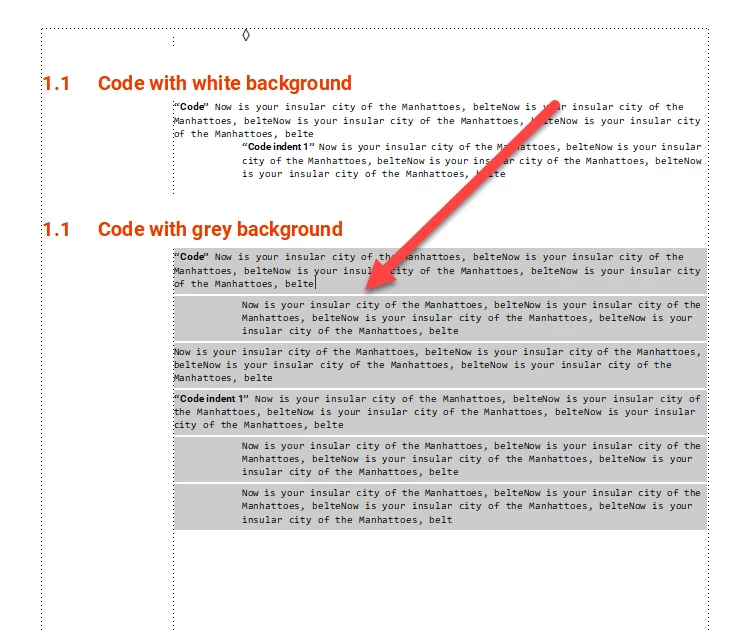
FrameMaker 16.0.4.1062. As I understand it, with FrameMaker 2020 we were supposed to be able to have a uniform fill behind paragraph text AND with no white lines below. In this document I have added grey background colour in the font setting. I have added grey color in Advanced - Paragraph box and a grey line above and below, the paragraph. This should give me a uniform grey colour behind the entire text. Only I STILL get white lines below the paragraphs.

So... CAN this be made to work? Is it possible to have a uniform fill color behnd the text with no white lines?

 

    This topic is closed to new replies. Start a new post to keep the conversation going.
    Barb Binder
    Barb BinderCorrect answer
    Community Expert
    Aug 30, 2022 9:37 PM UTC

    Yes. Use a negative value for spacing above paragraph (i.e., -4pt or -6pt).


    ~Barb

    ~Barb at Rocky Mountain Training

    3 replies

    Barb Binder
    Community Expert
    Barb BinderCommunity ExpertCorrect answer
    Community Expert
    Aug 30, 2022 9:37 PM UTC

    Yes. Use a negative value for spacing above paragraph (i.e., -4pt or -6pt).


    ~Barb

    Translate
    ~Barb at Rocky Mountain Training
    Dave Creamer of IDEAS
    Community Expert
    Community Expert
    Aug 31, 2022 4:36 PM UTC

    To adjust the paragraph space, you can combine the negative spacing for the above/below paragraph spacing with a reference page frame set to the fill color. 


    Translate
    David Creamer: Community Expert (ACI and ACE 1995-2023)