

Add/Edit Variable pod -- Create/Update buttons replaced by Edit?
I recently installed TCS2019 so now have FM 2019.
While I'm muddling through various surprises and hiccups, I noticed one change that has me befuddled --- did the functionality of Add/Edit Variable change between 2015 and 2017/2019? (or is there a setting to get the old functionality back?)
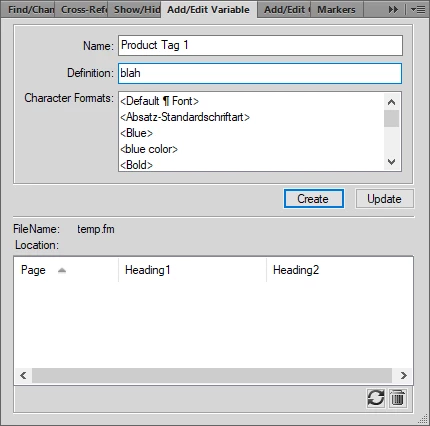
Specifically... in 2015, if I select a variable in the Variable pod and click the Edit or Create New user Variable icons, the Add/Edit Variable pod would appear with the currently selected variable and the Create button defaulted. (Which, yes, could be confusing given that you'd want to create a new variable from scratch, maybe)
Now, if I wanted to create a bunch of variants of a variable (in this case 'Product Tag 1'), I could change the Name, change the Definition, then click Create. (Or, if I wanted to rename the selected variable (or just change the definition), I could make my changes and click Update.)
I could create a bunch of variants (say "Product Tag 2", "Product Tag 3", "Product Tag 4", etc., with very similar definitions like "prodname1", "prodname2", etc.) quickly by doing this -- Click variable in Variable pod, click Edit (or Create New) icon, change name/definition, click create, change name/def again, click create, ...
(2015 pod here)
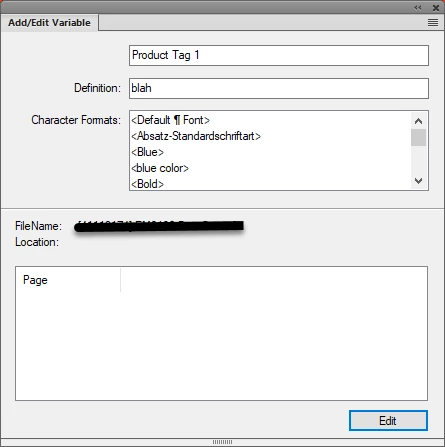
But in 2019, if I click the Edit icon, I get the pod with the selected variable, and I can *only* edit that variable. If I change the Name (no label on that field, by the way) and click Edit, it changes the name of the selected variable (doesn't create a new one). Which makes sense.
But... if I click the Create New icon, I get the pod with no name or definition, and have to create from scratch.
e.g. to create a bunch of tag variants, I Click variable in Variable pd, click Create New icon, enter a name, enter a definition, click Add (which creates it and clears the pod). Then I have to enter a new name and build the definition again, and click Add. ...
This is ... ungainly. Heck, if there were even an icon in the Variables pod to "Create Copy of Variable", that would be acceptable.
Just curious if I'm missing something here, or is this really the way it works now?


 AdChoices