December 9, 2013
Answered

Adding a character style to only one running header

  • December 9, 2013
  • 2 replies
  • 1516 views

Hello,

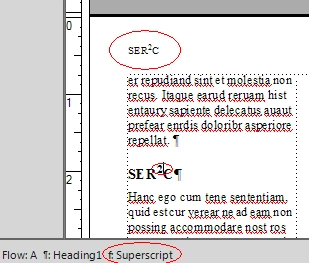
I have a running header in my document that picks up the ChapterTitle. For one particular chapter title, there is a superscript applied to one of the numbers in the ChapterTitle. The superscript doesn't come through on the running header.

I cannot figure out a way to get the character style changed just for that specific number of the running header other than making the running header a completely manual entry in the Master view, but that isn't ideal. Is this an easy fix that I am missing?  Image of issue here: http://cl.ly/image/370Y3n0O1g1r

Thanks,

Marita

    This topic has been closed for replies.
    Correct answer Arnis Gubins

    Thanks for all the tips, everyone. I wish I could report back a success but I can't figure out variables even after much reading on it. The Roman typeface with ctrl+q7 just makes an "o" with a diacritical mark and I am not sure how to type special characters starting with \ or the Alt+ characters. I am running Windows as a virtual machine on my Mac so that may be my problem.


    @Marita,

    If you are using a character tag that applies just the Suprescript property, then that will properly render in the running header using the <$paratext> building block. However, if you manually applied the superscript (i.e. used an override), then it will fail.

    2 replies

    Participating Frequently
    December 10, 2013

    Try setting up the S2ERC as a variable. You can format the "2" within the variable to look the way you want by utilizing the character format Superscript in the building blocks scroll down menu.

    Bob_Niland
    Community Expert
    Community Expert
    December 9, 2013

    My guess is that you are implementing the superscripted 2 in the source Chapter Title by using a normal "2" with SuperScript properties (doesn't matter whether override, Character Format or variable).

    Because superscript 1,2 & 3 are commonly available as inherently superscripted in many typefaces, use that instead (code point U+00B2 in Unicode).

    December 9, 2013

    Thanks for the response. Yes, I had superscripted a normal 2. I should mention that I'm working on Frame 7.2, which I think does not support Unicode, so I'm not sure if this solves my issue.

    Bob_Niland
    Community Expert
    Community Expert
    December 10, 2013

    > I should mention that I'm working on Frame 7.2,
    > which I think does not support Unicode

    It does not, but many older fonts include superscripted 1,2 & 3.

    2 is accessible via the Frame Roman special character \xb7 or Control+q 7