

Inspiring
August 4, 2022
Question

Adding a force break line in a header that is ONLY recognized in TOC

  • August 4, 2022
  • 2 replies
  • 876 views

Hi,

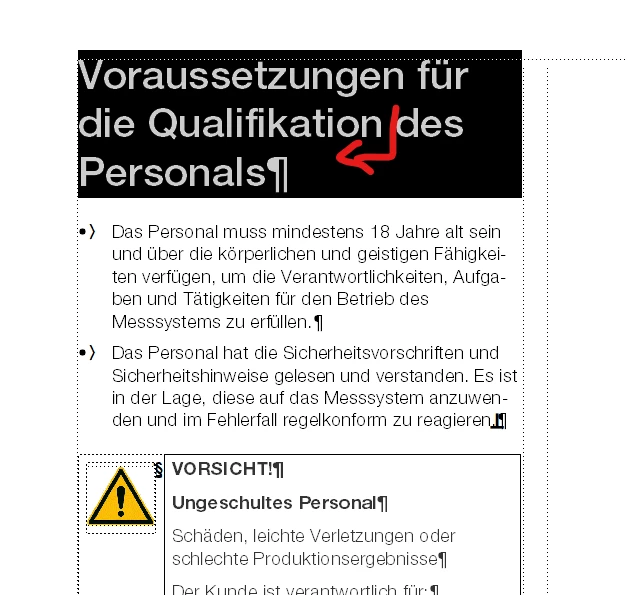
I am running FrameMaker 2020. There are instances where a header is quite long. When I generate TOC it pushes the page number on a second line. If I enter a line break (SHIFT+Enter) in TOC I notice that the new second line is not linked to the header. So, is there a way I can insert an invisible line break in the main header so that when I generate the TOC the header is set to flow on a second line without breaking the link between the TOC header and the header itself? I am sorry for my unprofessional language. I am attaching a screenshot that might help you understand my question.

In this image, I want to break the line so "des Personals" is moved on the second line

 

Yet, the header is fine in the body text and needs no breaking. However, is there a way I can add in here an invisible line break that TOC will honor?
 

Thank you in advance.


Sebastian

This topic has been closed for replies.

2 replies

Inspiring
August 12, 2022

Hi Sebastian,


This is strange. I tested your user scenario and break a TOC line after generation with a hard linebreak, then do the pdf. In my test the second line keep its hyperlink to the source. I'm using FM 16.0.4.1062.


Best regards,

Mats B.

Community Expert
August 4, 2022

Hi Sebastian,


Thank you very much for your description. I think it's clearly understandable.

I do not have this issue. Therefore there must be something going on.

FrameMaker ends a hyperlink area, when the formatting changes. Could it be that with your line break text has a different format than the first line? Even only a single character!

An additional suggestion: When you change the minimum/maximum values of the word spacing in your paragraph, the automatic line breaks are further to the left, so that text does not touch the area of page numbers.

It's not intuitive. In the TOC open the paragraph designer and go to the Advanced tab. Change the minimum value to 200 % and the maximum value to 125 % and leave the optimum at 100 %. Then update the style. This should fix almost all of your problem paragraphs.


Best regards


Winfried

Bob_Niland
Community Expert
Community Expert
August 4, 2022

I won't have time to test it for a bit, but I'm wondering if this common form of List wrapping could be controlled at the source Heading by using non-breaking spaces where TOC line breaks are not desired.

Community Expert
August 4, 2022

Hi Bob,


Yes, of course you can also enter non-breaking spaces in your source heading. However, that's a manual step. And often a non-breaking space would mess up your source text as you need a line wrap in the source text and in the TOC it's the other way round.