



K.Daube
Community Expert
Community Expert
May 25, 2016
Answered

AddText does not add

  • May 25, 2016
  • 2 replies
  • 1558 views

You know, my favorite errors ar typos... but I have not found any in my codet. So I hope You see my error.

  • I have settings stored in paragraphs of a reference page and want to replace them from contents of an array.
  • At line 6 fo the code snipped the alert displays that replaceString contains 5 lines.
  • Leaving debug mode after line 7 displays that the current content is selected
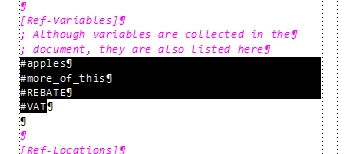
  • However, after performing line 9 nothing is inserted - the paragraph is empty

// var tr is defined in a subroutine
var replaceString  = "";
for (j = 0; j < gasUserVariables.length; j++) {
  replaceString = replaceString + "\n" + gasUserVariables;   // \n gives new paragraphs
}
alert (replaceString);
targetDoc.TextSelection = tr;                 // some ¶s excluding last ¶-mark
targetDoc.Clear(0);                           // delete selected content
targetDoc.AddText(tr.beg, replaceString);     // insert the text from the array

Where is my mistake?

BTW: in the function where I set up the selection I need to reduce FV_OBJ_END_OFFSET by 2 to exclude the final ¶ mark from the selection (snippet only):

var tr = new TextRange();
  tr.beg.obj =  oPara;                            // text range starts at the first found para
  tr.beg.offset = 0;
  while (oPara.ObjectValid ()) {
    pgfFmt = oPara.Name;
    if (pgfFmt == type) {                         // must not be interspearsed with other pgf formats
      tr.end = new TextLoc (oPara, Constants.FV_OBJ_END_OFFSET - 2); 
      oPara = oPara.NextPgfInFlow;
      continue;
    }
    break;
  }
  return tr;

I'm working in FM-13.

This topic has been closed for replies.
Correct answer K.Daube

Friends, I have now cleaned out everything which is not needed to demonstrate...

However, use this test file

// ReplaceParagraphs.jsx
// use test file ReplaceParagraphs.fm
#target framemaker

var gasUserVariables = ["#cats", "#dogs", "#HORSE", "#DUCKUMENT"]; 
var goCurrentDoc = app.ActiveDoc;                // the current document

PutRefPageItems ("Ref-Variables", "");

function PutRefPageItems (category, itemName) { // ================================================
  var flowName = "FM-calc";
  var oFlow, oPara, tr, targetDoc = goCurrentDoc;
  var j, replaceString;

  oFlow = targetDoc.FirstFlowInDoc;              // go to the relevant flow in (ref) page
  var notFound = true;
  while (oFlow.ObjectValid()) {
    if (oFlow.Name == flowName) {
      notFound = false;
      break; }
      oFlow = oFlow.NextFlowInDoc;
  }
  if (notFound) {
    alert ("PutRefPageItems:\nFlow «" + flowName + "» does not exist in document\n"+ targetDoc);
    return false;
  }
  oPara = oFlow.FirstTextFrameInFlow.FirstPgf;

  tr = GetParagraphs (oPara, "Ref-Variables");    // paragraphs to be replaced
//? $.bp(true);
  replaceString  = "";
  for (j = 0; j < gasUserVariables.length; j++) {
    replaceString = replaceString + "\n" + gasUserVariables;  // \n gives new paragraphs
  }
  targetDoc.TextSelection = tr;                  // set up the text range to clear the original text
  targetDoc.Clear(0);                            // clear it
  tr.end.offset = 0;                              // 0, 1 create 'appended' paragraphs;
                                                  // -1 inserts in previous ¶ with wrong format
  targetDoc.AddText(tr.end, replaceString);      // insert the new text
} // --- end PutRefPageItems

function GetParagraphs (oPara, type) { // =========================================================
  var pgfFmt;
  while (oPara.ObjectValid ()) {
    pgfFmt = oPara.Name;
    if (pgfFmt == type) {                        // skip this
      break;
    }
    oPara = oPara.NextPgfInFlow;
    continue;
  }                                              // we are now on the first of the relevant 
//? $.bp(true);
  var tr = new TextRange();
  tr.beg.obj =  oPara;                            // set up the starting text range as the very beginning
  tr.beg.offset = 0;
  while (oPara.ObjectValid ()) {
    pgfFmt = oPara.Name;
    if (pgfFmt == type) {                        // must not be interspearsed with other
      tr.end = new TextLoc (oPara, Constants.FV_OBJ_END_OFFSET - 1); 
      oPara = oPara.NextPgfInFlow;
      continue;
    }
    break;
  }
  return tr;
}

Lines 37 ... 39 are the 'crucial' ones.


Dear friends,

I have found the culprit! It is not the problem with the textrange, but what I insert: The empty paragraph at the beginning of the inserted sequece is the result of a wrong preparation of the inserted string. This starts with an \n ...

The relevant portion of the script must read

replaceString  = "";
if (gasUserVariables.length > 0) {
  replaceString  = gasUserVariables[0];
  for (j = 1; j < gasUserVariables.length; j++) {
    replaceString = replaceString + "\n" + gasUserVariables;  // \n gives new paragraphs
  }
}
targetDoc.TextSelection = tr;                  // set up the text range to clear the original text
targetDoc.Clear(0);                            // clear it
targetDoc.AddText(tr.end, replaceString);      // insert the new text

Thank You all very much for Your assistance!

... and lines 1 to 7 can be    replaced by

replaceString  = gasUserVariables.join("\n");

2 replies

Klaus Göbel
Legend
May 25, 2016

Hi Klaus,

In line 09 you use a textrange, but to insert text, you don't need a textrange, but a textlocation.

K.Daube
Community Expert
K.DaubeCommunity ExpertAuthor
Community Expert
May 25, 2016

OK, Klaus, but why then does this work in the famous script from Russ Ward in https://forums.adobe.com/message/3888653#3888653 which I have used in my last project?

while(FA_errno === Constants.FE_Success && loopCounter++ < 2*loopMax) { //find and replace loop as long as we keep finding
    activeDoc.TextSelection = tr;                // set up the text range to clear the original text
    activeDoc.Clear(0);                          // clear it
    activeDoc.AddText(tr.beg, replaceString);    // insert the new text at the original beginning of the text range
    tr.beg.offset += replaceString.length;        // lets jimmy the text range in memory to place it directly after

There are plenty of mysteries.

Klaus Göbel
Legend
May 25, 2016

Sorry.

Of course this is right.

tr.beg is a textloc

shame on me.

EDIT:

EDIT:

But in this case you are deleting the whole pgf and so the tr-object is deleted, too

K.Daube
Community Expert
K.DaubeCommunity ExpertAuthor
Community Expert
May 25, 2016

Hec, I can not edit my post ...

All said starting with "BTW: in the function ..." should be deleted. In the the screenshot you see wha I need a value of 2: there is an empty paragraph of the relevant type, which must not be there...