
Participant
May 8, 2019
Question

Adobe FM 2019 Error while updating the book

  • May 8, 2019
  • 2 replies
  • 702 views

Hi All,

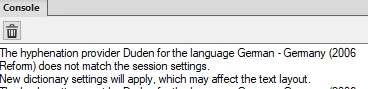
I use Adobe FM 2019. While updating the book that was created in Adobe FM 2017, I get the below error.

Also, does anyone know what could be a possible solution for the below error?
I look forward for your response.

Thank you.

Regards,

Amit

[Here is the list of all Adobe forums... https://forums.adobe.com/welcome]

[Comments is to ask about the operation of the Forum, not a specific program]

[Moved from the Comments forum to the specific Program forum... Mod]

    This topic has been closed for replies.

    2 replies

    Community Expert
    May 8, 2019

    Hi Amit,

    Message generated file:

    Can you open all files and then update?

    Possibly the TOC and index cannot be opened, and that's the reason.

    Otherwise it could be that these files are static files instead of a live TOC/index.

    Regarding the Duden message:

    I get this message always, when I have German files. I have Duden set in the Preferences.

    Annoying, but you can ignore it. There is an option in the Preferences to suppress this message.

    Best regards

    Winfried

    Participant
    May 8, 2019

    Hi Winfried Reng,

    Thanks for your response.

    1) Yes, if I open all the files, the book gets updated without an error. But, I am a bit worried now, as if I consider this as a solution, what if a book contains n number of chapters with 500 pages. It would take hour's to update. I need to find a permanent solution for this. Could you please suggest?

    2) Thanks a lot for this. I will do it right away.

    Best Regards,

    Amit

    Community Expert
    May 8, 2019

    Hi Amit,

    Which error messages did you get, when you opened the files in the book?

    In the Preferences in the Alerts section there is also this option: Opening an old release document

    Possibly with this option deactivated you can update the book, but I doubt it.

    I would make a copy of all files of the book and open and save all and then update the book.

    When anyone needs your changes, then save back as FM 2017, as Jeff had said.

    Best regards
    Winfried
    Jeff_Coatsworth
    Community Expert
    Community Expert
    May 8, 2019

    Is your FM2019 all patched up? Were you able to upgrade the FM2017 files into FM2019 ok?

    Participant
    May 8, 2019

    Hi Jeff,

    Thanks for your quick response.

    Yes, it is all patched up. Please note that, my colleagues use FM2017 and all the documents are created in FM2017. As I am the only one in the team to use 2019, I am not suppose to upgrade any files to 2019 as it could create a problem for them to edit and update. I am not sure if my assumption is right. Please suggest.

    Thank you.

    Jeff_Coatsworth
    Community Expert
    Community Expert
    May 8, 2019

    Well, AFAIK when you open a file in FM2019, it's upgraded at that point - if you don't save it, it's not a permanent change, but if you need to make changes, you can only save it as a MIF file for FM2017 compatibility (maybe FM2019 offers a Save as 2017 option - I haven't checked lately)