



mary_n_fingerlakes
Inspiring
September 14, 2026
Answered

Adobe FrameMaker won't install on my machine

  • September 14, 2026
  • 17 replies
  • 58 views

Hi  - Last week, the IT department at my company had to replace my computer and unfortunately, we cannot get FrameMaker to install properly on my machine. Since the IT folks are remoting into my machine and doing the install as admin users, I don’t really have any insight into what is going wrong. All I know is that the installation appears to be complete, but when I go to access my FrameMaker projects, I see that the .FM extension is not on my files:
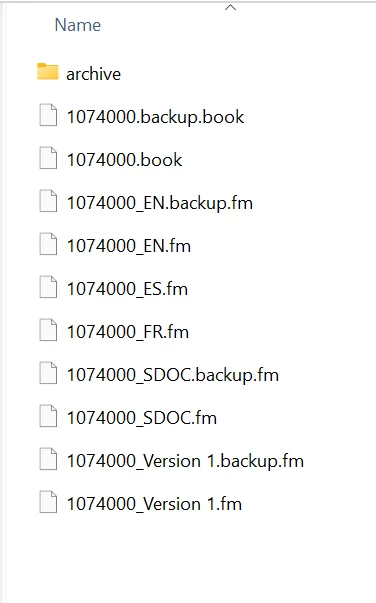
 

Any help would be greatly appreciated. Thank you.

    Correct answer mary_n_fingerlakes

    @frameexpert, ​@Jeff_Coatsworth, ​@Dave Creamer of IDEAS, and ​@Two-fer - The IT department found a solution! They used a pre-packaged Adobe FrameMaker install from the Adobe Admin portal rather than creating an installer package, which was the common practice for all previous installs. I hope this is helpful for other users who may find themselves in a similar position. Thank you all for your expertise and feedback. It’s very much appreciated. 

    17 replies

    mary_n_fingerlakes
    mary_n_fingerlakesAuthorCorrect answer
    Inspiring
    September 14, 2026

    @frameexpert, ​@Jeff_Coatsworth, ​@Dave Creamer of IDEAS, and ​@Two-fer - The IT department found a solution! They used a pre-packaged Adobe FrameMaker install from the Adobe Admin portal rather than creating an installer package, which was the common practice for all previous installs. I hope this is helpful for other users who may find themselves in a similar position. Thank you all for your expertise and feedback. It’s very much appreciated. 

    Two-fer
    Inspiring
    September 14, 2026

    Maybe a longshot, but….are you using a corporate Adobe account or a personal Adobe account? FrameMaker cannot be run using Adobe corporate account credentials (because there is no corporate version of FrameMaker). Here is what I put on the forum at the time: “I had the same issue with FM and Creative Cloud (specifically Illustrator and Acrobat Pro)--CC was on the corporate account and FM was on my personal account (because there is no business license version of FM (sigh)). In the end, Adobe Support had to move Creative Cloud to my personal account too so I could access both at the same time.”

    mary_n_fingerlakes
    Inspiring
    September 14, 2026

    Thanks ​@Two-fer

    Dave Creamer of IDEAS
    Community Expert
    Community Expert
    September 14, 2026

    First, look inside the root Programs>Adobe>FrameMaker folder to see if the program is actually installed.

    If not, that’s your problem (actually, IT’s). They can try a direct install.

    If it is, you need to right-click on an FM file; go to Open With, even if Frame is listed, go to Open Other; if Frame is not listed there, click for other program on computer and search for Frame. 

    (The problem with Frame and the Creative Cloud app was repaired [for me, anyway] on the latest update.)

    David Creamer: Community Expert (ACI and ACE 1995-2023)
    mary_n_fingerlakes
    Inspiring
    September 14, 2026

    @Dave Creamer of IDEAS - Thank you for the details. I will pass this onto IT.

    Jeff_Coatsworth
    Community Expert
    Community Expert
    September 14, 2026

    If the issue is that the FM icon doesn’t appear when looking at FM files - then that’s just the Windows File Associations that haven’t been set. That can be fixed in Windows by associating .fm and .book file types with FM.

    mary_n_fingerlakes
    Inspiring
    September 14, 2026

    I tried that and unfortunately, there is no FrameMaker program on my PC.

    Jeff_Coatsworth
    Community Expert
    Community Expert
    September 14, 2026

    That would be the problem - especially if your IT thinks that FM is part of the CS & not TCS.

    Jeff_Coatsworth
    Community Expert
    Community Expert
    September 14, 2026

    Your description is a bit vague - have you actually got FM (what version?) installed or are you running into issues (specifically?) when doing the installation?

    mary_n_fingerlakes
    Inspiring
    September 14, 2026

    Hi Jeff -- 

    Our IT team must install Adobe FrameMaker on my machine, so I don’t have any insight into how they are installing the program. I do know that they installed Adobe Illustrator and Adobe InDesign from the Creative Suite with no issue. I don’t believe they are getting any error messages on their end. All I know is that I can’t open the files on my machine; see the attached screenshot above. Thank you.

    mary_n_fingerlakes
    Inspiring
    September 14, 2026

    I did put in a ticket and the IT folks added this note to my ticket: