Hi Rick,
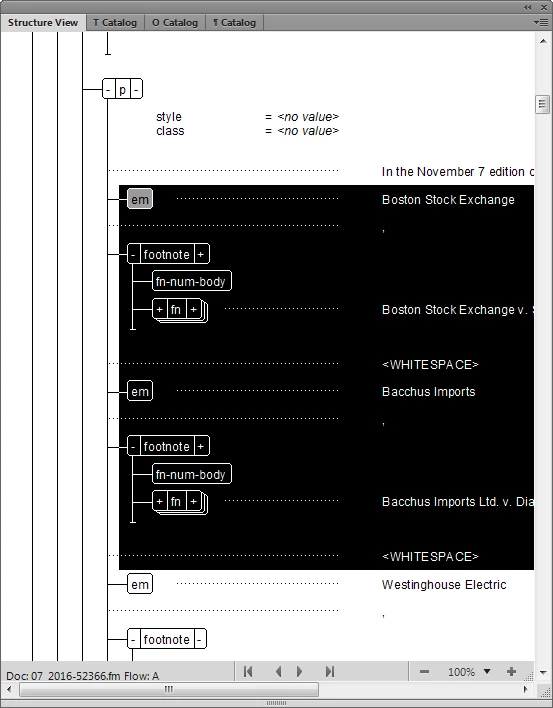
Here is some code that should get you most of the way there. The GetSelectedElements() function will get all top-level selected elements. For example, it will get the <em>, (text node), <footnote>, (text node), etc. from your sample. You should be able to easily modify it or use it in conjunction with your current function to get all descendants too.
I believe that function accounts for any nature of element selection, including a single element, multiple siblings, a text selection only, and insertion point only, and selected table cells without any full row selection.
By the way, for your code, did you consider element.NextElementDFS, rather than recursion?
Hope this helps. It was FDK code that I hastily converted to ES for this request. It's possible that I may have introduced a bug or two.
Russ
function elem_GetSelectedElements(oDoc, deriveElemWithoutSelection)
{
//initialize this
var elems = new Array();
//get the current element selection
var er = oDoc.ElementSelection;
//also, get the selected table, if there is one
var oTable =oDoc.SelectedTbl;
//if we have isolated cells selected, we run an entirely different process.
//when there are cells selected, the element range is all null. But, we
//can find the table and go cell-by-cell, getting the selected cells and their
//corresponding elements.
//This will also handle the case if there is no element selection at all.
if(!er.beg.parent.ObjectValid() && !er.end.parent.ObjectValid() &&
!er.beg.child.ObjectValid() && !er.end.child.ObjectValid() )
{
//We'll only look for anything if we have a valid table.
//Otherwise, there is no element selection and we will
//let the array return empty
if(oTable.ObjectValid())
{
var cells = GetSelectedCells(oDoc, oTable);
for(var i = 0; i < cells.length; i++)
{
elems.push(cells.Element);
}
}
}
//If there is no parent but there is a child, the HLE is
//selected. The child will be the HLE.
else if(!er.beg.parent.ObjectValid() && er.beg.child.ObjectValid())
{
elems.push(er.beg.child);
}
//If the parent and child elements are the same, there is a text selection
//or just an insertion point. If we are allowed to derive from a text selection,
//let's do that now.
else if( (er.beg.parent.id == er.end.parent.id) &&
( (!er.beg.child.ObjectValid() && !er.end.child.ObjectValid()) ||
(er.beg.child.id == er.end.child.id) ) &&
deriveElemWithoutSelection )
{
elems.push(er.beg.parent);
}
//otherwise, there are one or more elements selected.
//Let's get step down the tree and get them. Siblings only.
else
{
var oElem = er.beg.child;
//we start at the beg.child and step down through the siblings.
//When we get to the end child,
//we have reached the end of the selection. The end.child is not part
//of the selection. We can always start by adding the beg.child because
//that has to be in there.
while(oElem.ObjectValid() && oElem.id != er.end.child.id)
{
elems.push(oElem);
oElem = oElem.NextSiblingElement;
}
}
return elems;
}
...and you'll need this too:
function tbl_GetSelectedCells(oDoc, oTable)
{
var cells = new Array();
if(!oDoc.ObjectValid())
return cells;
if(!oTable.ObjectValid())
oTable = doc.SelectedTbl;
if(!oTable.ObjectValid())
return cells;
var oRow = oTable.TopRowSelection;
var bottomRowSelected = oTable.BottomRowSelection;
var leftColSelected = oTable.LeftColNum;
var rightColSelected = oTable.RightColNum;
while(oRow.ObjectValid())
{
var i = 0;
oCell = oRow.FirstCellInRow;
while(oCell.ObjectValid())
{
if(i >= leftColSelected && i <= rightColSelected)
cells.push(oCell);
i++;
oCell = oCell.NextCellInRow;
}
if(oRow.id == bottomRowSelected.id)
oRow = oDoc.GetNamedColor ("InvalidateThisObject");
else oRow = oRow.NextRowInTbl;
}
return cells;
}






 AdChoices