

Amalgamated Book (Structured FM 2022)
We have a number of separate training manuals (FM books) that we want to consolidate into a single manual (FM Book). To identify where each manual starts, we want to add some sort of "Section Heading".
I tried using Groups, but can't seem to include the Group Title in the generated Table of Content. I tried using Folders, but then the <$chapnum> system variable (used for the chapter numbers each manual) isn't updating (Chapter is disabled in the Numbering Properties). I did notice that Section is enabled in the Numbering Properties when I have Folders, but the Chapter number is still disabled.
I tried the FM Help file, but, like most Help files, it doesn't tell you really anything useful.
Short of adding a 'dummy' FM file before the first chapter in each manual with the "Section Heading", is there another, better way to achieve this?
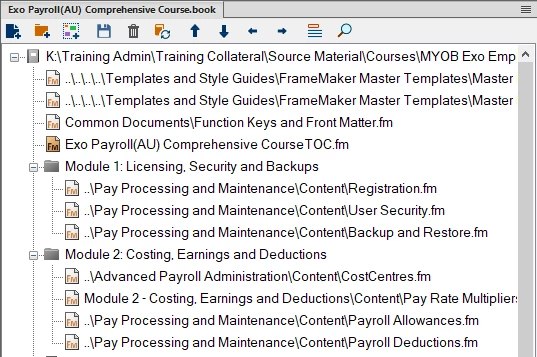
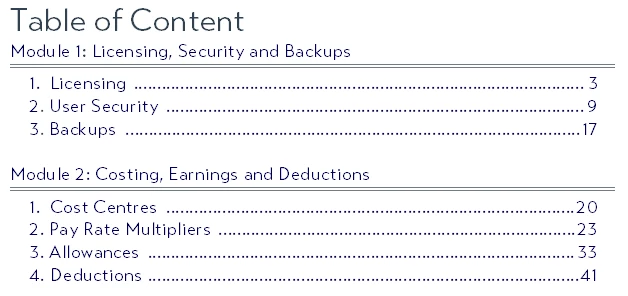
This is what I'm trying achive:
FM Book:
Generated TOC:


 AdChoices