



ANN: Copy one file to many folders
Hi, Here is the problem that was posed to me by a client: "I have one css file that I am trying to copy to a bunch of RoboHelp project folders. Is there any easy way to do this?" I couldn't think of a built-in Windows way to do this and I didn't think a shell script would be user-friendly enough, so this is what I wrote:
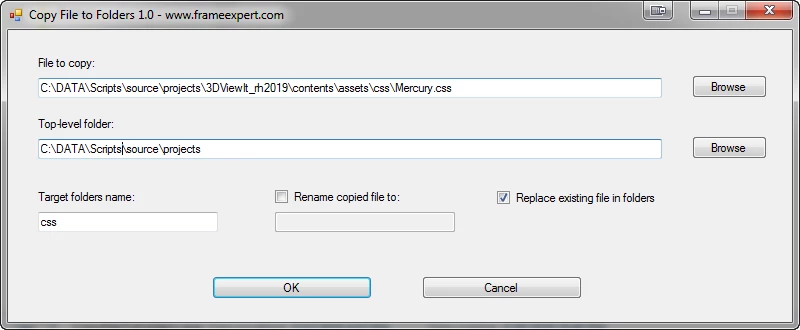
It should be self-explanatory, but here is how it works:
- Browse to the file you want to copy.
- Browse to the top-level folder that is the target for the copied file. All folders below the top-level folder will be processed.
- Enter the target folders name. The file you select in step 1 will only be copied to folders with this name. At this time, target folders with different names are not supported.
- You can optionally rename the file as it is copied.
- You can optionally replace an existing file with the same name in the target folders.
This particular client was editing a single css file and wanted it copied to 17 target folders. Since the edits were done interatively and she wanted to check the results throughout her project, this saved her tons of time whenever she made an edit. Note that the dialog box settings are "sticky" so that it is prepopulated with the last-used settings.
Please let me know if you would find this useful. I haven't set pricing yet, but it will depend on the level of interest that I get. Thank you. -Rick


 AdChoices