

Matt-Tech Comm Tools
Community Expert
Community Expert
October 14, 2021
Question

Anyone able to convert to HTML5 using "Convert to List (using CSS autonumbering)"?

  • October 14, 2021
  • 2 replies
  • 197 views

I tried converting a project to HTML5 using the settings below using Fm 16.0.2. 
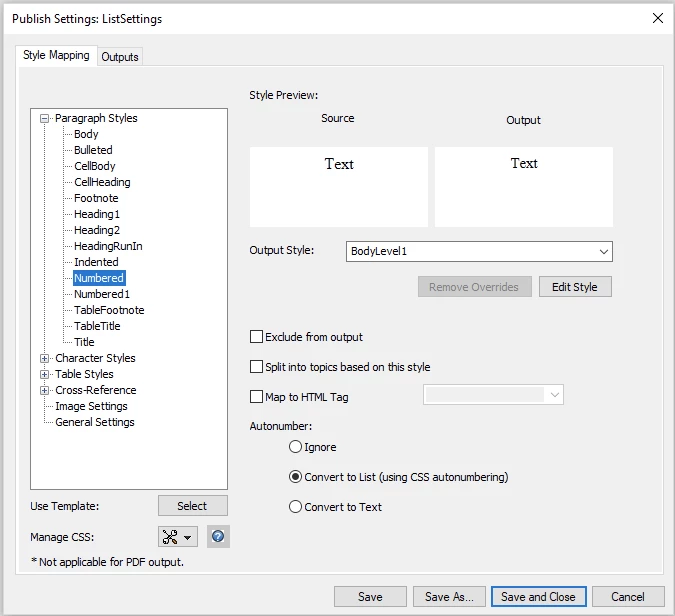
These are the same settings I've used for years, so I was surprised that the output contained <p class="BodyLevel1"> instead of converting to <ol> with nested <li> tags.

I then created a new test file with Fm 16.0.3, using a blank default document and a new STS file, and the same results.

So, anyone able to convert to HTML5 using "Convert to List (using CSS autonumbering)"? 

If so, any ideas why my conversion is failing?


-Matt

 
PS, it looks like there’s been a shift in processing…I don’t remember seeing:
  • <div> in the body
  • "Use Source Style" mapping of para tags behavior: 
    • Was Bulleted maps to <p class=“FM_Bulleted”>
    • Now Bulleted maps to <p class=“Bulleted”>


    This topic has been closed for replies.

    2 replies

    Adobe Employee
    October 21, 2021

    Hi,

    This is a behaviour change from FM2019.

    Now, for the option Covert to list(using css autonumbering), autonumbering is achieved using the CSS counters in p tags instead of converting to <ol> with nested <li> tags.

    However, there is a issue in this in which if we map it to any Output Style, then the autonumbering is not going in the HTML5 output. We are fixing this issue.


    Regards,

    Gaurav

    Matt-Tech Comm Tools
    Community Expert
    Community Expert
    October 15, 2021

    Today I set up the same test as yesterday in Fm 2019...with success.

    Here's the output; is anyone else seeing this?


    -Matt Sullivan, FrameMaker Course Creator, Author, Trainer, Consultant