


lisam18432430
Inspiring
Apr 4, 2019 8:37 PM UTC
Question

Arabic and English text formatting issues

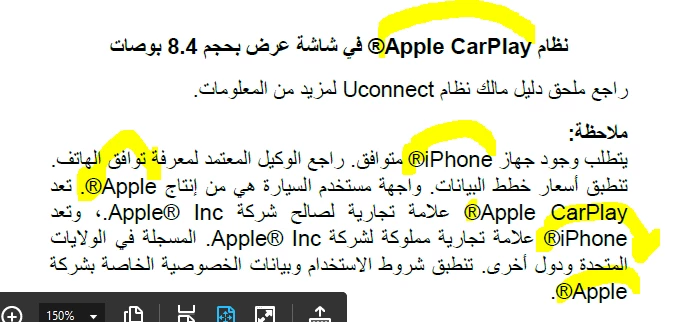
I am working in a 2019 Structured Framemaker book with Arabic and English text. The book and text are set to read right-to-left for Arabic, however, I need to make the Registered trademark symbol appear on the right side of the English Brand names for which I am unable. Are there any tips and tricks out there?
This topic is closed to new replies. Start a new post to keep the conversation going.

2 replies

Legend
Apr 4, 2019 9:00 PM UTC

You need to place a so-called Unicode Control Characters  before and after the whole string: A "Right-To-Left Mark" (RLM) before Apple, and a "Left-to-Right Mark" after the ©.

So to say, like this: [RTM]Apple CarPlay©[LTR]

So, for this:

يعد استخدام Apple CarPlay© ممتعًا.

Enter the marks like this:

يعد استخدام [RLM]Apple CarPlay©[LRM] ممتعًا.

To get this result:

يعد استخدام ‏Apple CarPlay©‎ ممتعًا.

You can insert the markers in the text with the Direction Toolbar (View > Toolbars > Direction Toolbar).

You can also insert Unicode Control Characters in the Find/Change dialog by right-clicking in the text fields.

Translate
Be.eM
Inspiring
Apr 5, 2019 1:18 PM UTC

Stefan,

the terms "before" and "after" are misleading in this context, not following the logical cursor movement in that text. If you put a right-to-left mark before "Apple" (which is left of the "A"), you'll get the opposite of what you want. Actually the whole paragraph is RTL, just "Apple©" should appear LTR, and then the text should continue in RTL.

In my experience just using the plain RTL/LTR markers doesn't work reliably in the context of latin text within arabic paragraphs. I've had best success when using the "left-to-right embedding" and the "previous/original writing direction" markers for that. To be precise:

  1. after the last arabic word, press the cursor button once to have the cursor directly left of the "A"
  2. enter the "left-to-right embedding" marker. This will change the order of all following text, but that doesn't matter yet.
  3. using the cursor button, step through the whole word "Apple©", until the cursor is just right of the "©"
  4. now enter the "original writing direction" marker (or a right-to-left marker for that matter)

Now it should look as expected.

Bernd

Translate