

Assigning an object style based on context
Greetings!
I am working on an XML application that uses the same element <graphic> for inline elements (for example icons in a paragraph) and general figures.
I have two object styles:
- inline: sets the "anchor position" to "insertion point"
- figure: sets the "anchor position" to "Below current line"
(I apologize if my property names are off; I'm actually using FrameMaker in Japanese, so I don't have the correct English names.)
I want to have a context rule where, if the <graphic> element is a child of <para>, it's assigned the "inline" style. If it's a child of <figure>, it's assigned the "figure" style. My current EDD looks like the following:
Initial graphic element format
1. If context is:para
Insert imported graphic file.
Anchored Frame Object Style:inline
Else
Insert imported graphic file.
Anchored Frame Object Style:figure
However, when I import my XML into FrameMaker, only the "else" clause takes; all <graphic> elements have an object style of "figure".
When I change the Else to ElseIf and specify the context "figure", no object styles are applied to any <graphic> elements.
So it seems that the context is not registering. But I'm pretty sure my context specifications are right. Below is the structured view:
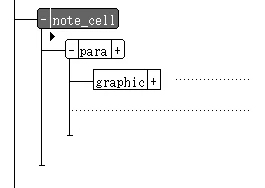
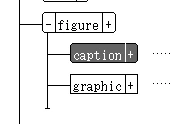
Any ideas?
This doesn't seem like it should be too hard (paragraph formats all work correctly in their contexts).


 AdChoices