apuwdm2
Inspiring
October 30, 2018
Answered

Automatically adding character style to a paragraph style

  • October 30, 2018
  • 2 replies
  • 746 views

Hello everyone,

A relative newbie here. Apologies in advance if this has been discussed earlier.

I want to make the first line or few words of a paragraph style in a bold style. Is there a way to apply character style to a certain part of a paragraph style?  I know this can be done in Indesign, but can unstructured Framemaker do this?

https://indesignsecrets.com/tip-of-the-week-creating-automatic-run-in-headings-with-numbered-paragraph-styles.php

Thanks in advance!

Regards


Apurva

This topic has been closed for replies.
Correct answer Be.eM

Apurva,

yes, you can do it exactly like described for Indesign in your link above, or via an actual "run-in heading" as the link title suggests:

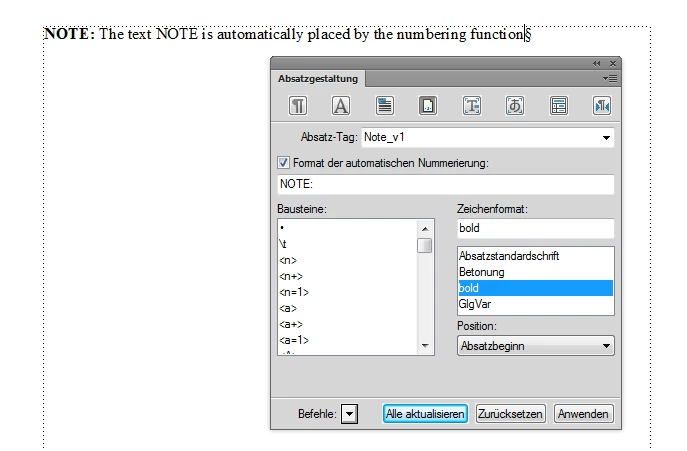
1. If the text is always the same (like e.g.: NOTE), you can put it into the numbering field of the paragraph designer:

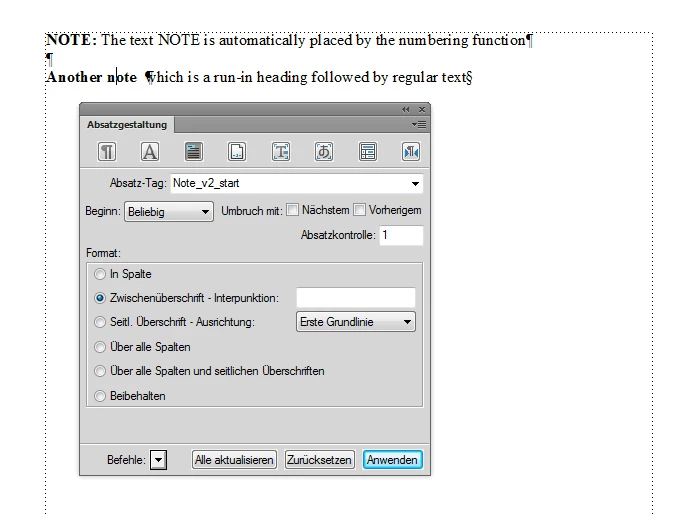
2. If you want to have variable text at the beginning, just define a paragraph format as "run-in heading" followed by a regular text format:

Bernd

2 replies

Be.eM
Be.eMCorrect answer
Inspiring
October 31, 2018

Apurva,

yes, you can do it exactly like described for Indesign in your link above, or via an actual "run-in heading" as the link title suggests:

1. If the text is always the same (like e.g.: NOTE), you can put it into the numbering field of the paragraph designer:

2. If you want to have variable text at the beginning, just define a paragraph format as "run-in heading" followed by a regular text format:

Bernd

Jeff_Coatsworth
Community Expert
Community Expert
November 1, 2018

Excellent! I stand corrected - never used it myself, so didn't know it existed.

Jeff_Coatsworth
Community Expert
Community Expert
October 30, 2018

Yes, but I don't think it's "baked in" like ID does it. I think you'd just have to select the text and apply the desired character tag to it.