
QuintinSeegers
Legend
June 26, 2018
Answered

Automatically insert anchored frame into table cell

  • June 26, 2018
  • 2 replies
  • 478 views

I need to automatically insert an image in the outside margin next to a specific paragraph tag.

This is what I'm trying to achieve. I left the borders on to show the anchored frame and text fram border.
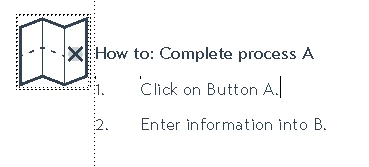
I know I can automatically insert an image below or above the paragraph tag and use that in a 2-cell table, but that creates too much space above and below the paragraph tag.

I was wondering if anybody have any suggestions of automatically inserting the graphic next to the paragraph tag, or using the paragraph tag option, but have the table row height not resize to the image size. It's used several places in our documents and updating the image file at each instance is a hassle.
This topic has been closed for replies.
Correct answer QuintinSeegers

Thanks Barb and TCT for your suggestions.

@Barb: Yes, I'm trying to automate it.

@TCT: Inserting an anchored frame is what I'm trying to automate. Creating a font is not an ideal solution as the image may change in the future. I've never had any issues with 2-cell tables - I use them quote extensively without problems.

I did manage to find an acceptable solution using my 2-cell table option. I changed the paragraph tag with the image to place the image below the paragraph and changed the max row height to 0.5cm.

2 replies

Matt-Tech Comm Tools
Community Expert
Community Expert
June 26, 2018

You have a few options, but the two best ones are probably:

  • Insert the graphic into the paragraph using an anchored frame set to outside column
  • Create a font that includes the icon (or choose a character in an icon font like Font Awesome) and then use the character in the autonumber sequence

I stay away from the 2-cell table solution, as it causes a number of issues, including making HTML5 output more of a headache.

I prefer the font solution, and here's how my warnings, notes and cautions appear in my Fm reference and workbooks (borders and text symbols showing)

-Matt Sullivan, FrameMaker Course Creator, Author, Trainer, Consultant
QuintinSeegers
QuintinSeegersAuthorCorrect answer
Legend
June 26, 2018

Thanks Barb and TCT for your suggestions.

@Barb: Yes, I'm trying to automate it.

@TCT: Inserting an anchored frame is what I'm trying to automate. Creating a font is not an ideal solution as the image may change in the future. I've never had any issues with 2-cell tables - I use them quote extensively without problems.

I did manage to find an acceptable solution using my 2-cell table option. I changed the paragraph tag with the image to place the image below the paragraph and changed the max row height to 0.5cm.

Barb Binder
Community Expert
Community Expert
June 26, 2018

Hey, that's great. Glad you are back on track, quintins18520333

~Barb

~Barb at Rocky Mountain Training
Barb Binder
Community Expert
Community Expert
June 26, 2018

Hi quintins18520333:

From the first screenshot it looks like you understand how to use the Outside Column position for an anchored frame, and now you are trying to automate that process? Is that correct?

How about creating an object style for the frame? Then you can copy the frame (with the content and object style) and paste it where necessary. Most importantly, if you need to edit the frame (position or otherwise), you can do so via Graphics > Object Style Designer. When you save the updates and close the dialog box, the other instances will update automatically.

~Barb

~Barb at Rocky Mountain Training