

Daniela Barros
Known Participant
June 20, 2021
Question

Automatically text Format change

  • June 20, 2021
  • 3 replies
  • 968 views


Hello guys,


I am working on a standard format for an unstructured documentation package.


I was wondering if there is a faster way to change the format of headings without having to go over each one. Every time there is a change I have to go over each.

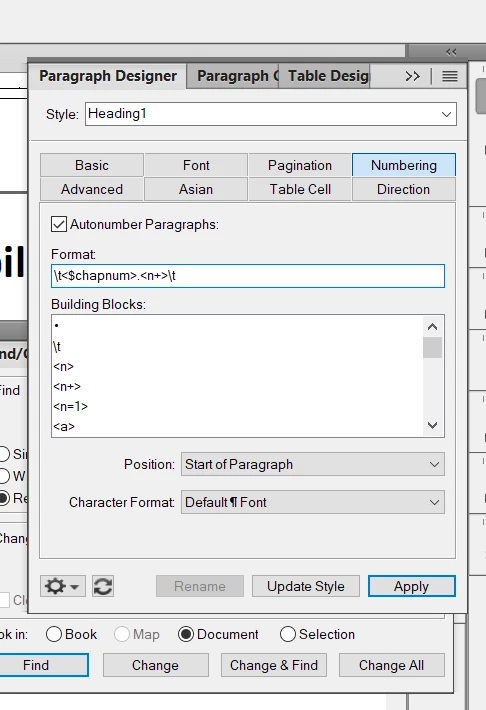
I have copied the format and I am pasting it on each of the headings.   I thought it could be faster if I could use the find/change, is it possible to search to a specific format such as \t<$chapnum>.<n+>\t? Any other suggestions? Thank you.


    This topic has been closed for replies.

    3 replies

    Jeff_Coatsworth
    Community Expert
    Community Expert
    June 21, 2021

    Wouldn't it be easier to maintain a separate template doc with all the types of paragraph tags in it, edit it as they change & just import the formats into your "real" docs?

    Inspiring
    June 21, 2021

    As long as there is more than one "real" document, @Jeff_Coatsworth is absolutely correct that it is a good idea to maintain a template that has the current definitions of all formats (not just paragraph formats) that will be reused.


    A template is simply a FrameMaker document that is used in this way.  To copy formats from the template into a working document, open both files. Then, from the working document, use File > Import > Formats. The resulting dialog allows you to choose the formats you want to change and whether you want to preserve overrides to those formats. The command is also available from a book where it affects all files that are highlighted in the book window.


    @Daniela Barros originally asked about updating multiple paragraphs with the same tag. It is relevant to point out that every paragraph in a FrameMaker document has a paragraph format, including a tag. The document also has a paragraph catalog that defines formats that can be applied to existing paragraphs in the document. A paragraph in the document can have the same tag as a format defined in the catalog or a different format. If a paragraph's tag does match that of a catalog entry, other properties in the actual paragraph may be the same or different from the corresponding values in the catalog entry. Thus, a particular paragraph may override one or more properties if desired.


       --Lynne

    Inspiring
    June 20, 2021

    Daniela,

       You cannot search for a specific autonumber in a FrameMaker document, but you may be able to accomplish what you want without searching:


    1. If you want to change all occurrences of Heading1, click in one occurrence, make the change, and then click Update Style.


    2. If you have multiple formats/styles in the paragraph catalog and want to make the same change to all of them, create a sequence of paragraphs (you can delete it after you've updated the catalog) that includes one instant of each format:

        a. Select all these paragraphs.

        b. From the commands pull-down menu in the lower left, select Global Update Options.

        c. In the resulting Global Update Options dialog box, select the options you want and click Update.

        d. Delete any temporary paragraphs.


    3. If you want to change paragraphs whose formats are not in the catalog, you can add them to the catalog with File > Utilities > Create and Apply Formats. This command will create catalog entries as needed for each variation of the paragraph format that appears in your document.


       --Lynne 

    Daniela Barros
    Known Participant
    June 20, 2021

    Lynne, Thank you very much 🙂

    Inspiring
    June 20, 2021

    In the Find/Change dialog box, you can search for a specific Paragraph Tag instead of by Text.

    Daniela Barros
    Known Participant
    June 20, 2021

    Thank you!