


Participant
July 26, 2013
Answered

Autonumber bug in headings following a procedure

  • July 26, 2013
  • 1 reply
  • 1158 views

Hoping someone has an answer to this...

I'm on Frame 11 (11.0.0.380) on Windows 7.

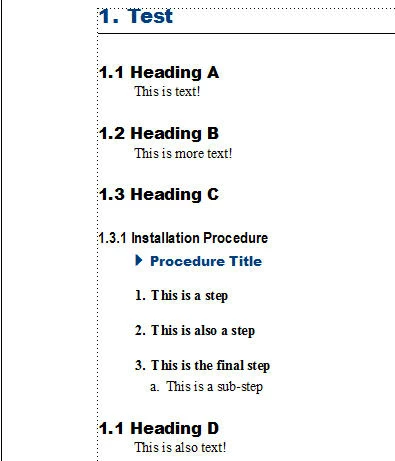
I'm running into a strange issue with headings that are autonumbered. Everything works as expected... until I include a proccedure that has autonumbered steps and sub-steps. The heading immediately following the procedure renumbers from the beginning. The image below shows an example. There are three headings, which are numbered correctly. Then I inserted a subheading with a procedure and the heading below it has incorrect numbering. This only happens in headings that follow a procedure.

The autonumbers for the paragraphs are:

Heading1: <$chapnum>.<n+>

Heading2: <$chapnum>.<n>.<n+>

Numbered: S:<n+>/\t

NumberedCont1 (sub-step): <a=1>.\t

Is there something incorrectly set up in the autonumber format or is this a bug?
This topic has been closed for replies.
Correct answer MichaelKazlow

Take a look at this. http://help.adobe.com/en_US/FrameMaker/9.0/Using/WSF176D8C8-8133-4860-88E3-AF69262623F0.html

The problem is in this paragraph with this numbering:

NumberedCont1 (sub-step): <a=1>.\t

You reset the numbering of the main paragraph back to 1, when you used the <a=1> tag since you did not preface it with S:.

1 reply

MichaelKazlow
MichaelKazlowCorrect answer
Legend
July 27, 2013

Take a look at this. http://help.adobe.com/en_US/FrameMaker/9.0/Using/WSF176D8C8-8133-4860-88E3-AF69262623F0.html

The problem is in this paragraph with this numbering:

NumberedCont1 (sub-step): <a=1>.\t

You reset the numbering of the main paragraph back to 1, when you used the <a=1> tag since you did not preface it with S:.

MichaelKazlow
Legend
July 27, 2013

You probably wanted something like S: <>.<a=1>

Participant
July 29, 2013

Thanks Michael! That worked!!