



mary_n_fingerlakes
Participating Frequently
February 26, 2026
Answered

Autonumbering in FrameMaker text insets changes from bullets to numerals

  • February 26, 2026
  • 2 replies
  • 80 views

I am working in a FrameMaker (version 17) book and the lists in my text insets in one of the FM files unexpectedly changed from bullets to numerals:
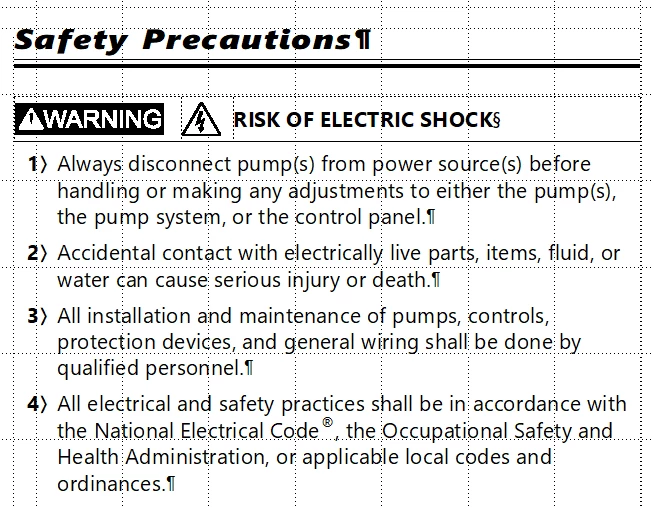


I checked the source file that contains the text insets and the lists show bullets as expected:



The numbering in the two other FM files (Spanish and French) is correct. 


Important things to note:

  1. I did not create this book, so the text insets were already there.
  2. The source file that contains the text insets is used across multiple FM projects and I checked other projects and the numbering is fine.
  3. When I select a text inset property in the impacted FM file, and go to Edit > Text Inset Properties > Settings, this is what I see:
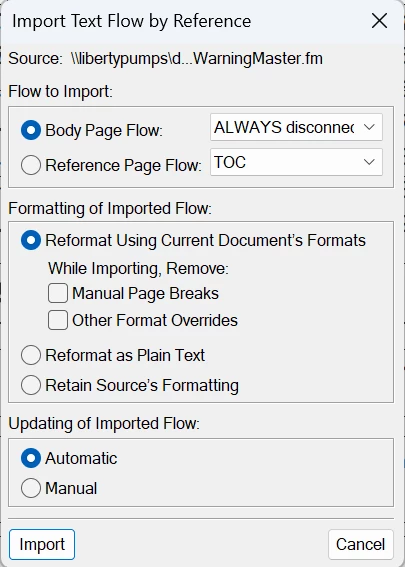
 

I’m sure I’m missing something obvious, but there has to be a way to revert the lists back to bullets without too much re-work.


Thank you.

    Correct answer frameexpert

    Under Formatting of Imported Flow, try choosing Retain Source’s Formatting and see if it fixes the issue.

    2 replies

    Jeff_Coatsworth
    Community Expert
    Community Expert
    February 26, 2026

    I bet that the paragraph tags in the text inset for those bullet points are being defined differently in the recipient doc as an ordered list. As Rick says, try the Retain Source’s Formatting option.

    mary_n_fingerlakes
    Participating Frequently
    February 26, 2026

    Yes! You are correct ​@Jeff_Coatsworth . Thanks again to you and ​@frameexpert. I appreciate it.

    frameexpert
    Community Expert
    frameexpertCommunity ExpertCorrect answer
    Community Expert
    February 26, 2026

    Under Formatting of Imported Flow, try choosing Retain Source’s Formatting and see if it fixes the issue.

    www.frameexpert.com
    mary_n_fingerlakes
    Participating Frequently
    February 26, 2026

    Problem solved! Thank you! I knew I was circling the most obvious fix! I appreciate the quick response!