
Inspiring
February 22, 2021
Answered

Avoid having an extra line before a table/graphic

  • February 22, 2021
  • 1 reply
  • 861 views

Hello,


I am working with a structured Framemaker (non-xml) document.


I noticed that each time I have a table or a graphic element, there is an extra line that is added before it, as illustrated below:
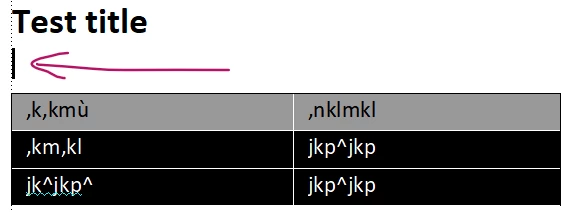
Here is what the structuired view looks like:
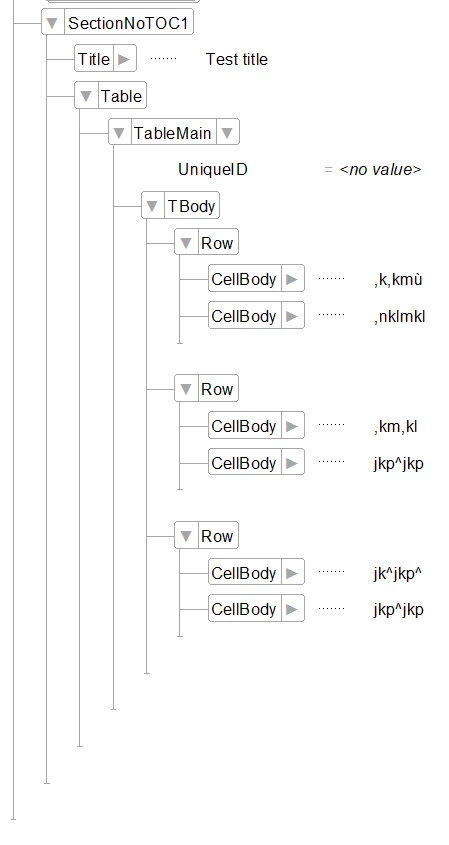
Do you know where that extra line comes from, and how I can get rid of it ?


Thanx in advance !


Eric

    This topic has been closed for replies.
    Correct answer Winfried Reng

    Thanx for your answer Wilfried !


    Actually, what I want is to get rid of the blank lines that is a waste of space, to be able to have a more dense layout.


    Is this possible ?


    Best regards


    Eric


    Hi Eric,


    Yes. This is possible.

    In the paragraph format with the anchor set space below to a negative value, e.g. -10 pt.

    And in the table format the same negative value as Table Margin Top.

    Then the table will be exactly on top of the table anchor.


    Best regards


    Winfried

    1 reply

    Community Expert
    February 22, 2021

    Did you select the table element?

    Could it be that this is just the paragraph with the table anchor?

    Can you show the text symbols? This is in the View menu.

    Eric5F88Author
    Inspiring
    February 22, 2021

    Hello Winfried,

    Thanx for your answer !

    Here is what it looks like with text symbols:

    Best regards

    Eric

    Community Expert
    February 22, 2021

    Yes. This is just the table anchor. Nothing to worry about. When you copy this thing, you copy the whole table. I do not know, how this is in a structured document. In a non-structured document you can put the insertion mark before or after this anchor and select this with SHIFT. So the anchor is like a non-width character.