
Moxamoll
Known Participant
December 2, 2010
Answered

Basic List Numbering Question

  • December 2, 2010
  • 1 reply
  • 680 views

I am trying to create a numbered list element, that will restart at 1 each time it is used.  The User Guide says "By default, each counter is initially set to zero. The counter can maintain its current value, be incremented by 1, or be reset to a different value. For example, use <n=1> in the format that resets numbering to 1 at the beginning of a new set of numbered steps."

So, I've built my EDD like this:
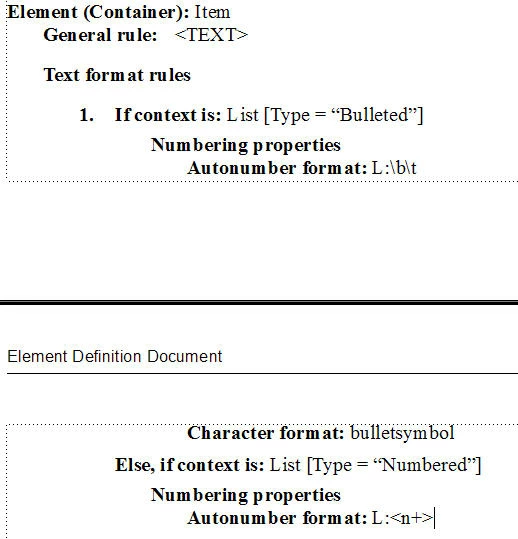
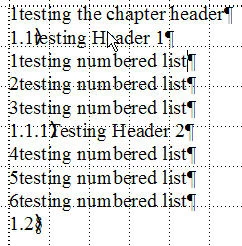
But when I import the EDD to test in a document, each list continues the numbering of the one before it. I've tried playing around with the syntax, but it's new to me and I can't figure it out.  How do I set it up so that each list starts with 1?

Here's an example of what I get (sorry it's ugly, I'm following advice and getting the structure set up before I do the pretty formatting!)
Thanks!

This topic has been closed for replies.
Correct answer Van Kurtz

First, when you have several lists, as well as numbered tables and figures, it is best to use a different series label for each type of list.This is especially important when you have lists inside lists and you want the numbering to change from say numbers to letters to roman numerals, etc. So, I would replace the L: in the Bulleted list format to something else, say B:. In fact, you can probably leave it out, because there is no distinction visually between the first bullet and the second, and the first bullet in the next list.

Second, I am not so sure that you can use <n+> in the autonumber format and expect it to restart at 1 with each new list. I believe the phrase "intially set to zero" means at the beginning of the document. You need to add a subrule inside the numbered list context that checks for the FIRST item element in the list element, and then set its number to L:<n=1>. This is how I do it (just a cut and paste from my EDD):

If context is: {first}
Numbering properties
Autonumber format: L:\t<n=1>.\t
Else
Numbering properties
Autonumber format: L:\t<n+>.\t

If you DO have a case in which you want the second list to continue numbering from a previous list, you can add an attribute to the List element that you can set for continuous numbering, and then check for it in your EDD.

Hope this helps,

Van

Message was edited by: Van Kurtz

1 reply

Van Kurtz
Van KurtzCorrect answer
Inspiring
December 2, 2010

First, when you have several lists, as well as numbered tables and figures, it is best to use a different series label for each type of list.This is especially important when you have lists inside lists and you want the numbering to change from say numbers to letters to roman numerals, etc. So, I would replace the L: in the Bulleted list format to something else, say B:. In fact, you can probably leave it out, because there is no distinction visually between the first bullet and the second, and the first bullet in the next list.

Second, I am not so sure that you can use <n+> in the autonumber format and expect it to restart at 1 with each new list. I believe the phrase "intially set to zero" means at the beginning of the document. You need to add a subrule inside the numbered list context that checks for the FIRST item element in the list element, and then set its number to L:<n=1>. This is how I do it (just a cut and paste from my EDD):

If context is: {first}
Numbering properties
Autonumber format: L:\t<n=1>.\t
Else
Numbering properties
Autonumber format: L:\t<n+>.\t

If you DO have a case in which you want the second list to continue numbering from a previous list, you can add an attribute to the List element that you can set for continuous numbering, and then check for it in your EDD.

Hope this helps,

Van

Message was edited by: Van Kurtz

Moxamoll
MoxamollAuthor
Known Participant
December 2, 2010

I thought that somehow I needed to nest an "If/Else" within an "If/Else", but I couldn't figure out how. Subrules!

Thank you!