



Answered
Beware of side effects!
Dear friends,
This really happend on April 1 and since then I was uncertain what to do against this problem.
I wanted to extend my Enhanced Tool Bars (ETB) with a button pup-up menu for the case changes (lower case, UPPER CASE, …)
- I added a script defined function for "Sentence case"
- The button was there, but it did not become active.
- At that time I did not have a solution for the inactive button (see Problems with Fly out menus)
- I started typing in my documentation about this ETB enhancement.
- But when it came to enter a lower case u nothing happened, even "un" was digested and nothing appeared in text. So I entered text by using the U and then ALT+F1 to make it lower case.
- Finally I discovered a magic word, which I could not enter completely: "undefined". Whyle typing this the cursor did not advance on the screen.
- After having solved the problem with the inactive button I discovered this in the pup-up menu: u n d e f i n e d at the place where the command short cut becomes visible.
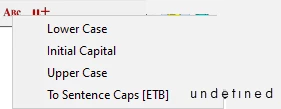
Oh yes, I do not need such a short cut, hence i just left it out
oCmd.SentenceC = DefineCommand (7, "ETB_ToSentenceCap", "To Sentence Caps [ETB]");
After defining an empty string, everything is OK now
oCmd.SentenceC = DefineCommand (7, "ETB_ToSentenceCap", "To Sentence Caps [ETB]", "");
So the default for the short cut label (undefined) became the short cut which digested my typing…


 AdChoices