FrameMaker keeps track of many connections between files, so it's critical to have all necessary resources available when opening files. You have files that use unavailable resources.
These unavailable resources prevent FrameMaker from opening the files cleanly.
Because FrameMaker can't open the files, it can't resolve cross-references and other things, and you get more errors.
To resolve your problem(s), go to your preferences and set Alerts as follows (I choose not to Show warnings while clearing history)
Start with the first file in your book and
Open the file
Resolve any unavailable resource messages
Repeat until you get to the end of your book file and have no more messages.
Then update your book, and resolve any other messages.
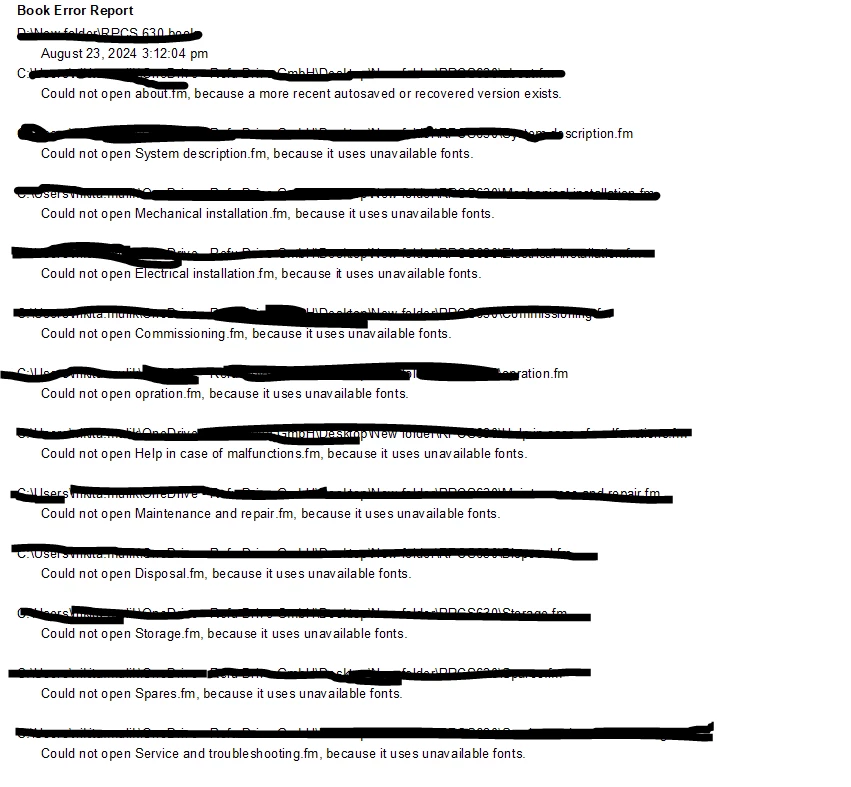
The messages listed in your screen shot can be bypassed by opening all of the files before updating the book.
File > Open to open your book.
Shift + File > Open all Files in Book. Address all notifications about locked files and the availability of recovery files. (Both of these indicate an earlier crash with open files.)
With the book window active, choose Shift + File > Save all Files in Book.
Ahter insering cross refrence . Ctrl + alt and doble cloick on cross refernce it will go to taget.... but when i open fill it shows an error mgs that unsolved cross refrence
Is this cross-reference target in the same file or in another file?
If in another file: What happens, if the target file is open, before you open the file with the cross-reference?
Possibly there are more cross-references to other files. Open all files with the targets of these cross-references, before you open the file with the cross-reference.
There is a panel managing fonts which you can find here:
View->Panels->Fonts
If there is a missing font, the font panel will show it with a red x like this:
You can click "Replace" and get a dialogue like this, allowing you to replace the missing font, with one that actually is in your system or the current document:
Regarding the fonts, DIN Pro and Ciutadella, I did a Google search, and they seem easy to find and download.
Regarding the Cross References.... There is also a Cross References panel, which can be found here: View->Panels, Cross References. As with the fonts panel, broken cross references will display with a red x. You can click on the broken reference in the panel and be led to the occurrence of the reference. Fixing the reference is a matter of finding the marker or paragraph referenced.
It would really help, if you describe, when you get your issue!
I guess that you tried to update a book and that you got these messages.
Generally: When there are such issues, FrameMaker cannot open the books without user intervention. Then FrameMaker cannot perform the book update.
Open all files in the book and then, when all files are open, update the book.
And the meaning of the messages:
o more recent version. Check, if there is a file with a file name with "recover.fm". FrameMaker creates such files, when it crashes. Check, if the recover file is more correct than the other file without recover. As far as I know the recover file is just a MIF file of the regular file.
o unavailable font. Somewhere in the file there is text with a font which you do not have on your PC. You have to check, if this affects the display in your file. Open the Font panel in the View menu. There are all fonts listed. Fonts can also be used on reference pages ore master pages or in the definition of a table format. You can also search for "unavailable font" in this forum, as lots or people had already asked, what they should do.
Yes guessed correct .. i try to create a book ... i create a files individual and then in new document creaqte a book and adding those file in book to bind those invidal file in one file. upadting thoise file pages and chapter...before updating oped those file ... it is correctly updated... but every time it shows an error message realated to cross refrence.. can frame maker craete PDF of book ignoring those error mesasges... I am using DIn pro and Ciutadella family fonts those are installed in my system. still it shows an error message... Is those are paid fonts ???
I am not able to solve cross refence ralated issue i saw many video... marker is also shown at the begining at target .... when i press ctrl + alt pointer is chaange and click on them it goes to target
Did you find any information in the Fonts panel (View | Fonts)?
When the missing fonts are not used somewhere on your content pages, you can also accept that FrameMaker changes missing fonts permanently (Edit | Preferences | Remember Missing Font Names).
Regarding your cross-references: I still believe that this is a missing font issue. FrameMaker has problems to open your files and therefore says that cross-references are unresolved.
Can you open all files, then update (with all files open)? Do you still get any messages? Can you then create a PDF?



 AdChoices