
Participant
July 12, 2020
Answered

Book Menu within Welcome window so small I can't read it ... HELP!!!

  • July 12, 2020
  • 4 replies
  • 430 views

I just installed Framemaker update V15.0.5.838, now all of sudden welcome window is proper size but the Book window is so small I can't read it.
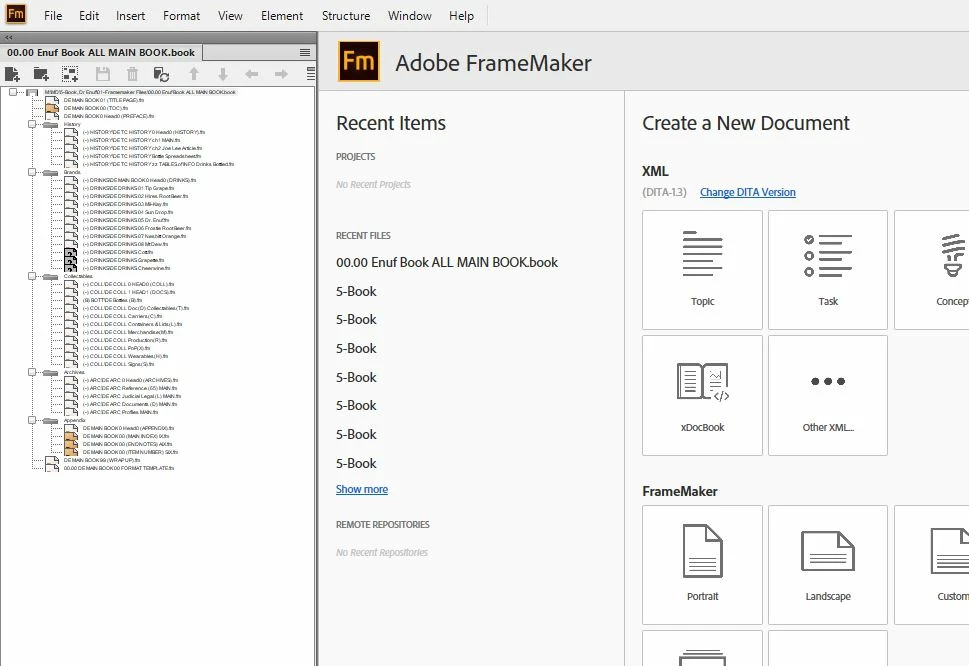
First time this has happened.  I am using Windows 10 latest version and all updates.  Computer is an HP ZBook 17 G4.    Every other program is proper size ... would appreciate any help .. I simply can't read the window to work with the book.  THANKS

    This topic has been closed for replies.
    Correct answer Winfried Reng

    Hi,


    This was discussed a few months ago:

    https://community.adobe.com/t5/framemaker/book-panel-list-of-files-font-size-is-unreadable/m-p/11005010?page=1


    Barb Binder had posted the answer:

    Click inside the book window and then tap Esc z i (consecutively, not all at the same time) until the type size looks good to you (or just click the + icon next to Fit Page in Window).

    FrameMaker will resize either the document window or the book list type size, depending on which one is active.


    By the way, the latest update is 15.0.956. You should update.


    Best regards


    Winfried

    4 replies

    Barb Binder
    Community Expert
    Community Expert
    July 13, 2020

    Katy:


    I am sure people get tired of having to tell us newbie that it has already been answered, but honestly we try 🙂

    We really don't mind repeating answers. It's the ones that we can't find a solution for that drive us nuts. Or maybe that's just me. 


    ~Barb 

    ~Barb at Rocky Mountain Training
    Community Expert
    July 13, 2020

    Hi,


    Thank you very much for your praise! Your issue took only two minutes. No problem.

    This was something which I had not known myself. I just remembered that there was a discussion some time ago.


    Best regards


    Winfried

    KatyDewAuthor
    Participant
    July 13, 2020

    THANK YOU, THANK YOU !!!!!  I am a bit new to all this.   I did search the forum but didn't find that post, I quess I did not use the correct search argument.  I am sure people get tired of having to tell us newbie that it has already been answered, but honestly we try 🙂    THANKS YOU for taking the time to re-tell the solution, I was stumped and could not continue my work .... GREATLY APPRECIATED!!!!

    Winfried RengCommunity ExpertCorrect answer
    Community Expert
    July 13, 2020

    Hi,


    This was discussed a few months ago:

    https://community.adobe.com/t5/framemaker/book-panel-list-of-files-font-size-is-unreadable/m-p/11005010?page=1


    Barb Binder had posted the answer:

    Click inside the book window and then tap Esc z i (consecutively, not all at the same time) until the type size looks good to you (or just click the + icon next to Fit Page in Window).

    FrameMaker will resize either the document window or the book list type size, depending on which one is active.


    By the way, the latest update is 15.0.956. You should update.


    Best regards


    Winfried