

SecretOne
Participating Frequently
March 26, 2020
Answered

Book panel list of files font size is unreadable.

  • March 26, 2020
  • 4 replies
  • 1276 views

Hi everyone,

First post here as I cannot find an answer anywhere else.

In Framemaker 2019 15.0.4.751

I was issuing a "Fit Page to Window" from the bottom right and for some reason the font size in the book window has gone really small and I cannot find a way to enlarge it again.

All books now open with this super small font.
See picture below.
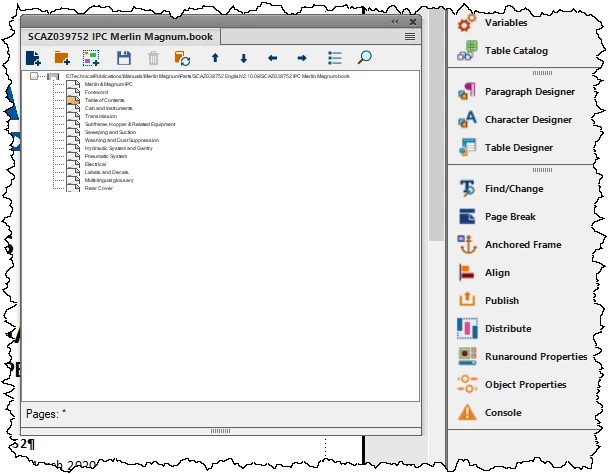
 

I am using 3 x 1920x1200 monitors if that is of any use.

Can anyone help ?

Thanks in advance,

Andre

    This topic has been closed for replies.
    Correct answer Barb Binder

    Click inside the book window and then tap Esc z i (consecutively, not all at the same time) until the type size looks good to you (or just click the + icon next to Fit Page in Window).


    FrameMaker will resize either the document window or the book list type size, depending on which one is active.


    ~Barb

    4 replies

    frameexpert
    Community Expert
    Community Expert
    March 26, 2020

    You can also press the Control key and roll your mouse wheel to increase or decrease the size of the book window contents.

    www.frameexpert.com
    SecretOne
    SecretOneAuthor
    Participating Frequently
    March 26, 2020

    Hi framexpert,
    That does not work for me!

    Works for my content but not for the book file panel.

    Andre

    frameexpert
    Community Expert
    Community Expert
    March 26, 2020

    I stand corrected! It doesn't work for me either in FrameMaker 2019. I thought I was able to do this, but maybe it was an earlier version. I am sorry for posting the wrong information.

    www.frameexpert.com
    Barb Binder
    Community Expert
    Community Expert
    March 26, 2020

    First post here as I cannot find an answer anywhere else.

    Great. And don't be afraid to come back and ask questions in the future. We are very friendly! 😊


    ~Barb

    ~Barb at Rocky Mountain Training
    Jeff_Coatsworth
    Community Expert
    Community Expert
    March 26, 2020

    You might try updating to patch 5 too.

    SecretOne
    SecretOneAuthor
    Participating Frequently
    March 26, 2020

    Hi Jeff,


    Just doing that now, thanks for the "update" 😉


    Cheers,

    Andre

    Barb Binder
    Community Expert
    Barb BinderCommunity ExpertCorrect answer
    Community Expert
    March 26, 2020

    Click inside the book window and then tap Esc z i (consecutively, not all at the same time) until the type size looks good to you (or just click the + icon next to Fit Page in Window).


    FrameMaker will resize either the document window or the book list type size, depending on which one is active.


    ~Barb

    ~Barb at Rocky Mountain Training
    SecretOne
    SecretOneAuthor
    Participating Frequently
    March 26, 2020

    Thank you Barb,

    Did not know that existed. I am so glad I can still learn something each day.
    Stay Safe,

    Andre