
Answered
Book update alters quotes
When updating a book FM is altering smart quotes to straight quotes in the generated index even though smart quotes is enabled in text options.

When updating a book FM is altering smart quotes to straight quotes in the generated index even though smart quotes is enabled in text options.
The smart quote feature is specifically designed for typing directly in a FrameMaker document. For example, if the feature is disabled and you type quotes they will appear as inch marks (aka straight quotes). If you then enable smart quotes it will not fix the existing inch marks. You have to fix those manually, or via spell check.
If they're appearing in a generated index, then I'm going to make the guess that they are entered as inch marks in the marker dialog box. You will need to edit the marker text to use the actual open and close quotes.
~Barb
EDIT: I just keystroked this and confirmed that this is likely the issue.
If you type a quote into the marker box (with or without smart quotes enabled) you will get inch marks when you update your book. Again, smart quotes only work on the document page.
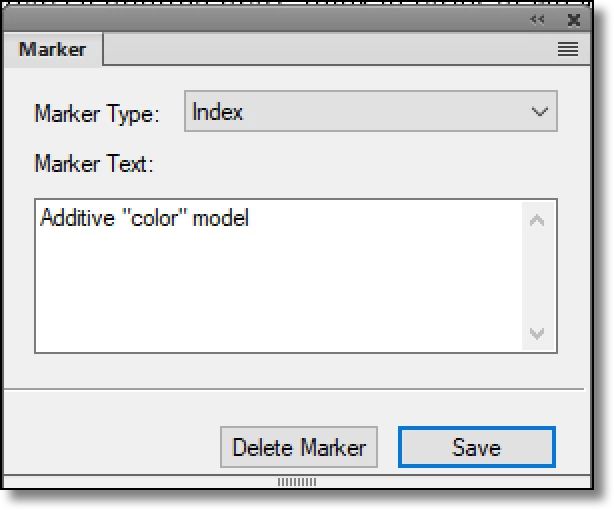

If you enter the characters for the open and close quotes, you will get the correct quotes.
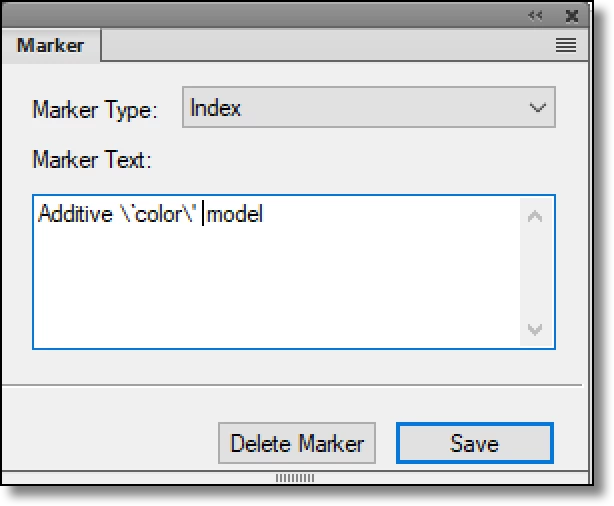

Note: you can circumvent having to type in the special characters by copying content from the page. If the content you copy has the correct quotes in place, when you paste them into the dialog box they will work correctly. If you're typing directly into the dialog box, you'll need to use the special characters.
\` (backslash left apostrophe) is the open quote and
\' (backslash right apostrophe) is the close quote
Already have an account? Login
Enter your E-mail address. We'll send you an e-mail with instructions to reset your password.


 AdChoices