
Participant
February 8, 2022
Answered

Breaking PDF into separate files

  • February 8, 2022
  • 3 replies
  • 578 views

Hey there,

Back in the day, when you would PDF a book, there was an option to create separate files from each file in the book.  This was done I believe through the distiller process.  Now, Frame distills files natively, and I no longer see this option.  Is there a way to do this?  I have literally hundereds of forms that are created that I want in separate files, and this used to be so easy, but now, I can only figure out to open each file and PDF them, which is suuuuch a waste of time when I know I could do this before!  Help please ❤️  I can't find anything about this feautre anywhere.
    This topic has been closed for replies.
    Correct answer Matt-Tech Comm Tools

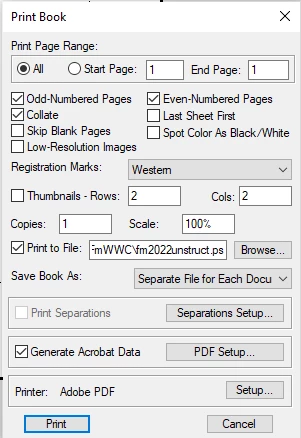
    The Print Book dialog in Fm 2020 still has the option you're looking for.

    If the separation of PDF files is a primary objective, you might do best using the Print route, rather than Publish.

    (Pretty sure this is the first time I've recommended the "old" engine to an Fm 2020 user!)

    -Matt


    3 replies

    Matt-Tech Comm Tools
    Community Expert
    Matt-Tech Comm ToolsCommunity ExpertCorrect answer
    Community Expert
    February 9, 2022

    The Print Book dialog in Fm 2020 still has the option you're looking for.

    If the separation of PDF files is a primary objective, you might do best using the Print route, rather than Publish.

    (Pretty sure this is the first time I've recommended the "old" engine to an Fm 2020 user!)

    -Matt


    -Matt Sullivan, FrameMaker Course Creator, Author, Trainer, Consultant
    Participant
    February 9, 2022

    Thank you SOOOO MUCH!   I had looked at even printing to PDF but didn't even realize this option still existed since I usually do Print as PDF.   The book is literally just used for things like spell checks, searches etc. for hundreds of airline forms that have no connection with each other, and one of those advantages to the book was printing to individual files with their own name.  I'm so excited right now!!  HOURSS dealing with this!! 

    Thanks again!

    Matt-Tech Comm Tools
    Community Expert
    Community Expert
    February 9, 2022

    Glad I could help! 

    If this solves your issue, make sure to mark as correct so others find the answer more readily.

    -Matt

    -Matt Sullivan, FrameMaker Course Creator, Author, Trainer, Consultant
    Jeff_Coatsworth
    Community Expert
    Community Expert
    February 9, 2022

    What version of FM? If you're running the current FM2020 version, you can still use the Print to PDF or Save As PDF options (the new PDFL route works with the Publish option). If your "separate files" choice isn't presented in any of the PDF creation routes (I've never used it, so I'm not sure where you get to see it), then I would suggest logging a feature request in the Tracker (https://tracker.adobe.com/).

    Matt-Tech Comm Tools
    Community Expert
    Community Expert
    February 9, 2022

    I believe the Save as PDF in Fm 2020 uses the new engine via the Publish route, not the Print to PDF route. 

    The following dialog, appearing after using Save as PDF seems to confirm that


    -Matt Sullivan, FrameMaker Course Creator, Author, Trainer, Consultant
    Jeff_Coatsworth
    Community Expert
    Community Expert
    February 9, 2022

    I must have missed that Matt - iirc it wasn't there in the beginning of FM2020.

    Bob_Niland
    Community Expert
    Community Expert
    February 9, 2022

    Do any links in the split PDFs need to be able to reference other sections of the parent document (presuming they are in the correct web/directory) relationships?

    If not, any number of PDF tools, including full Acrobat DC/Pro can do PDF splits.