



Almtuna
Inspiring
December 30, 2025
Question

Bullet now comes with a question mark in chm (FM2022)

  • December 30, 2025
  • 3 replies
  • 324 views

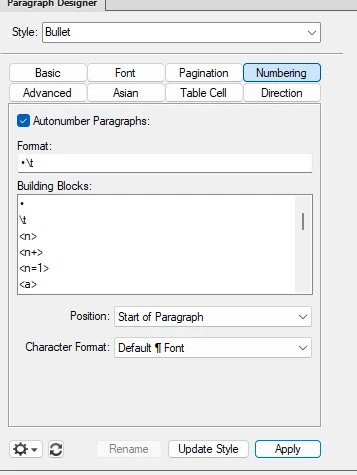
My FrameMaker 2022 document uses a paragraph format with an automatic bullet in the "Numbering > Format” field.
Almtuna_0-1767129602860.png


The FM2022 created chm file displays this as:


Almtuna_4-1767129757333.png


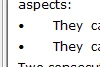
While FM2019 had no problem with this:
Almtuna_5-1767129867031.png


However, the MIF output for the autonumbering is identical in both FM 2019 and FM 2022, but:
- FrameMaker 2019: The CHM output displays the bullet correctly.
- FrameMaker 2022: The CHM output displays the bullet followed by a question mark.


How do I get the desired output using FM2022?

    3 replies

    Jeff_Coatsworth
    Community Expert
    Community Expert
    December 31, 2025

    @Almtuna  What exact FM 2022 version are you running? They may have patched your issue already, but CHMs are such antique tech these days that I wouldn't hold your breath.

    Community Expert
    December 31, 2025
    Bjørn Smalbro - FrameMaker.dk
    Jeff_Coatsworth
    Community Expert
    Community Expert
    December 31, 2025

    @FrameMaker-dk Did running the old Help Workshop installer have effect?

    Community Expert
    December 31, 2025

    I did some experiments with chm a little while ago (https://community.adobe.com/t5/framemaker-discussions/mpj-single-source-error/td-p/14971137 ) and it was a sorry mess, unfortunately.

    I believe you will have to replace the /t tab character in the numbered paragraph set up with em spaces or merely blank spaces. My thinking is that the question mark is FrameMaker being unable to replace the tab characte with a fixed space. Taking out the tab character and replacing it with a blank space, will probably make things work for you. An option to streamline the process, might be to make a template document where the tabs have been replaced which you can import before exporting to chm.

    Bjørn Smalbro - FrameMaker.dk
    Jeff_Coatsworth
    Community Expert
    Community Expert
    December 31, 2025

    @FrameMaker-dk - just had a look at that thread (you may want to edit your URL - you've got the last ")" included which throws a 404) & maybe running the old HTML Help Workshop installer might fix things up for the OP.

    Bob_Niland
    Community Expert
    Community Expert
    December 31, 2025

    You might copy that • out of the MIF and confirm that it's a
    U+2022: BULLET
    and that the Bullet para font on your FM2022 system populates that code point. Unicode has a lot of bullets, but they are all BMP (U+FFFF or below), so this isn't an SMP problem.

    The •? does not make sense on its face.
    If \u2022 is unpopulated, should should see:
    ?›     The
    If no tab is set, you should see:
    •›The
    ? normally means ‘current font doesn't populate codepoint’, but the bullet is working, and the \t is more likely just a rendering instruction, possibly not even emitted as
    U+0009: CHARACTER TABULATION (\x09)
    but even if it was, it's a whitespace character, has no glyph, and should never throw a ?.

    You might try selecting all of the Format:'s •\t
    and replacing it with a fresh \b\t just to ensure no stray hidden characters.