
Callouts in AI not transferring correctly when art inserted in FM
I have a situation where I create an illustration in Solidworks Composer (verison 2023) and save it as a jpeg. I then open this file up in Adobe Illustrator (2024) and add callouts. The callouts look good in AI (see below). I then save the file as an AI file and as a SVG file.
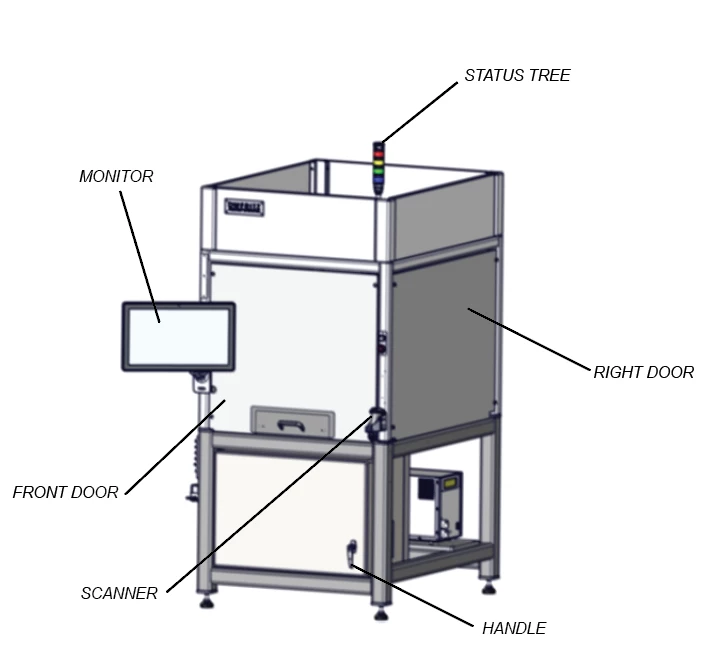
When I insert the svg file into my FrameMaker document (2020) some of the callouts are not pointing to the correct items. Somehow they get moved around (see below)
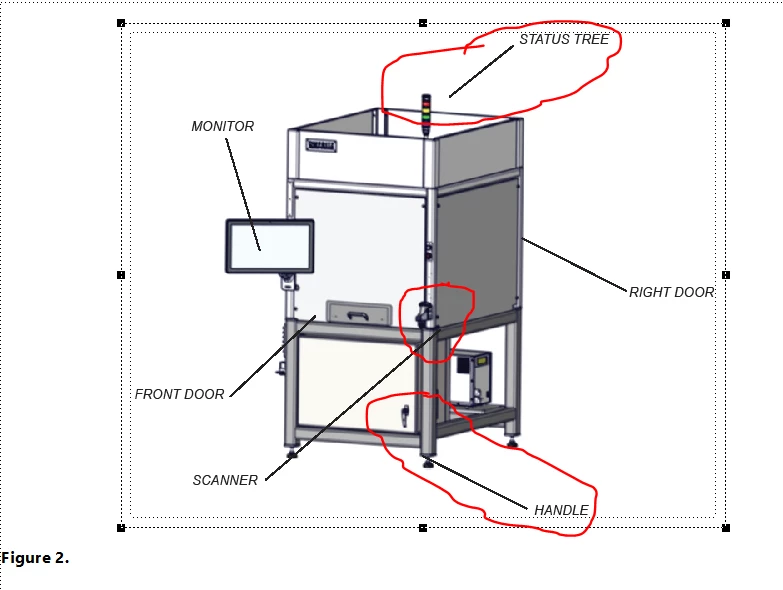
I recently updated my Adobe Creative Suite about 2 weeks ago and that is when this all started to happen. If the callout is indicating a large item (like Right Door or Monitor), it isn't much of an issue because the line still hits the item I am calling out. But, when the callout is for smaller items (like Handle and Scanner above), the lines move too much to where they are not even touching the item in question.
I don't know if this is a AI, FM issue or SW Composer issue. When I do callouts directly in SW Composer, save it, then open in AI to crop and save as an AI & svg file, when I insert into FM document, the callouts seem to stay in place. But there are times I need to add callouts using AI and right now it is hit and miss. I am finding I have to move the lines around until they actually touch the item.


 AdChoices