


Known Participant
April 30, 2014
Answered

Can Frame12 include master page or reference page objects in HTML Help output?

  • April 30, 2014
  • 1 reply
  • 704 views

Hi, I am trying out a copy of FrameMaker 12.

Whilst I can do a lot with the settings available to tweak in the Publish dialog, there still doesn't seem to be any way to include objects from Master Pages or Reference Pages in the CHM output?

When using TechCommSuite, I can get around this by applying "Master Pages" inside RoboHelp (e.g. to add a boilerplate footer to each topic with a small copyright statement and company logo).

It doesn't look like there's any way to do this with Frame12's Publish command? Or am I missing something?

This topic has been closed for replies.
Correct answer Arnis Gubins

Sorry if I'm being an idiot. but...

I read the new Help page for this feature (Adobe FrameMaker 12 * Using HTML page templates )

I understand what it's telling me, but it does not explain how to get the Publish command to use the HTML Master page template that I've made. How do I actually do this?


David,

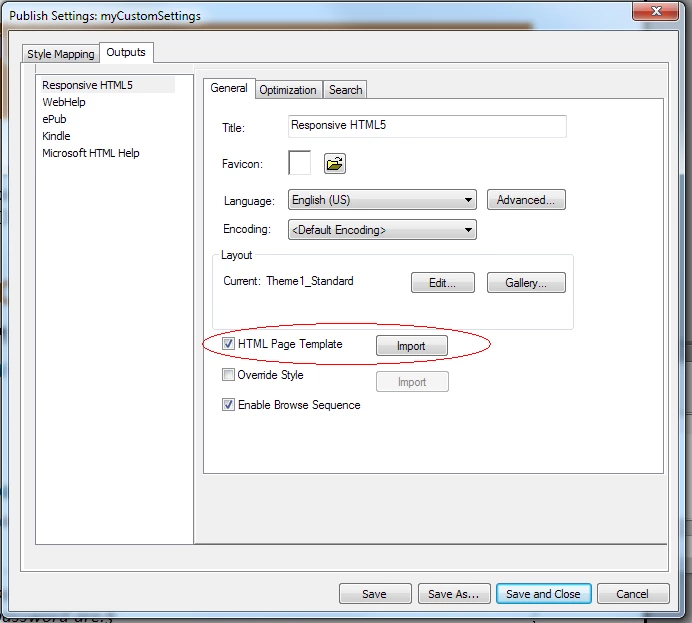
If you look in the Outputs > General properties page of the Publish Settings, there is now an option to import the HTML template file. The option kind of works in a bass-ackwards manner, you have click the check box first, then you get a window to select the file, and then you have to click the Import button.

1 reply

Arnis Gubins
Inspiring
April 30, 2014

Use the Set Template option on the Style Mapping panel:

David__DAuthor
Known Participant
April 30, 2014

I'm not sure that would achieve what I'm after.

In my existing TechCommSuite4 workflow, basically what happens is that each 'chapter' in my Help is n seperate .fm file (with a Heading1 at the top), and then my RoboHelp settings split the .fm into topics at each Heading1, Heading2 and Heading3, and append a boilerplate footer onto each topic. (The boilerplate footer is a RoboHelp 'master page', it had a horizontal line and a company logo graphic).

Doesn't the "Set Template" button you highlight just tell Frame12 which .fm file to take Para, Character, Table and Cross Ref styles from? But it will ignore Master and Reference Page graphics and objects there, will it not?

Adobe Employee
May 7, 2014

David,

This has been fixed in FrameMaker 12.0.2 update released yesterday. In the General tab of Edit Settings dialog you will find an option to Import HTML Page Template. You can use your existing MasterPage template which you created in RoboHelp earlier. Or see the Help topic how to create new Page Template to use in FrameMaker 12.

To install the update click on Help > Updates menu in FrameMaker and then choose the relevant option.

Vivek

Adobe Systems