
Participant
November 24, 2018
Answered

Can I create a two line title for a figure double table?

  • November 24, 2018
  • 1 reply
  • 426 views

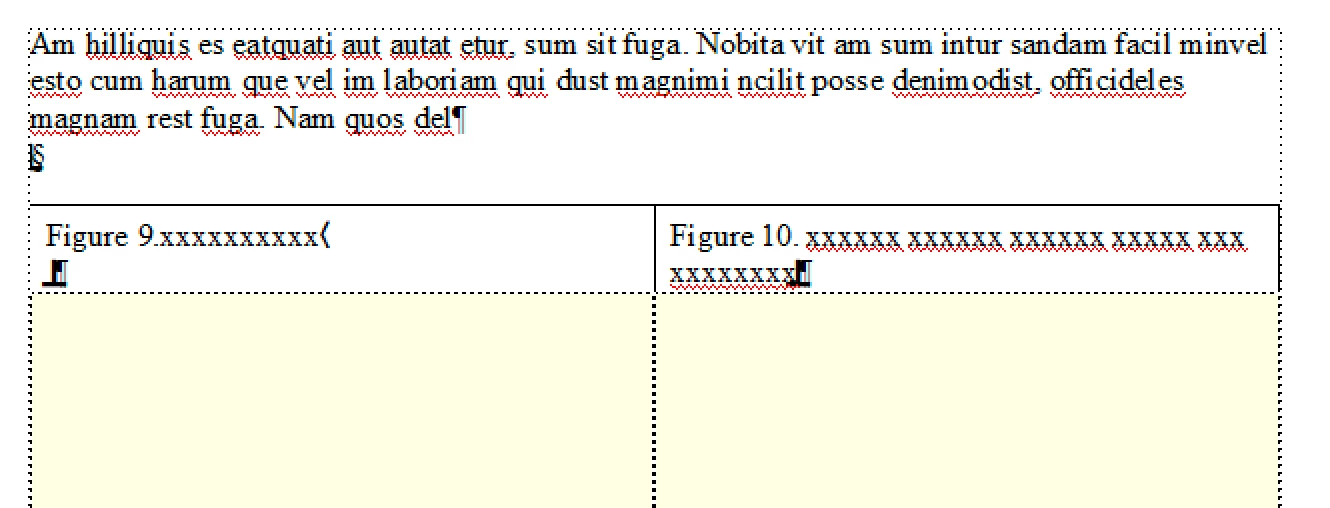
I have inserted a Figure Double table into my document. One title is longer than the other and so the frames look skewed. Can I have a second line in the shorter title but without any text?
    This topic has been closed for replies.
    Correct answer Barb Binder

    Perfect, Dean, thank you!

    Drag the anchor for Fig 9 to the end of the line, move directly in front of it and then press Ctrl+Enter.

    ~Barb

    1 reply

    Barb Binder
    Community Expert
    Community Expert
    November 25, 2018

    Hi :

    I haven't heard of a "figure double table", so I'm trying to picture this layout (screen shots eliminate the guesswork).

    Do you have two figure titles (or two table titles) sitting side by side? Are you trying to line up the object underneath? Did you try adding a line break (Ctrl+Enter) at the end of the shorter text to start a new line?

    If I'm guessing wrong, please provide screen shots to illustrate the issue.

    ~Barb

    ~Barb at Rocky Mountain Training
    TechDeanAuthor
    Participant
    November 25, 2018

    Hi Barb,

    Thank you for your reply.

    My issue should be clear with the attached screenshot. I tried Ctrl+Enter but that brings me to the bottom of the frame and not the next line.

    I would like Fig 9 to have 2 lines as Fig 10 has even if there is no info on the second line.

    I haven`t worked with FM for some years and I feel that there is a simple solution that just escapes me at the moment.

    Any advice is greatly appreciated.

    Regards,

    Dean

    Barb Binder
    Community Expert
    Barb BinderCommunity ExpertCorrect answer
    Community Expert
    November 25, 2018

    Perfect, Dean, thank you!

    Drag the anchor for Fig 9 to the end of the line, move directly in front of it and then press Ctrl+Enter.

    ~Barb

    ~Barb at Rocky Mountain Training