


Participating Frequently
December 2, 2014
Question

Can I disable the attribute pop-up menu?

  • December 2, 2014
  • 1 reply
  • 610 views

Can I disable this annoying attribute pop-up menu that appears whenever I press CTRL and the mouse cursor happens to be over an element tag?
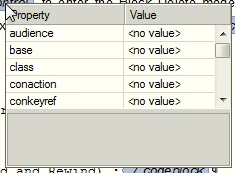
This has disrupted my work more often than I care to count, and I'm tired of hitting CTRL+C or X only to later CTRL+V a weird empty table where I wanted to paste text. I don't want to have to pay attention to where my mouse cursor is every time I want to copy or cut something.

This topic has been closed for replies.

1 reply

Legend
December 8, 2014

Hi ohnehosen,

I don't have an answer for this, but I didn't like to see a post go unanswered either. I looked around for a solution, including perhaps a setting in the maker.ini file, but I could not find anything. I agree that it is a profoundly annoying feature that should have an on/off switch.

It only seems to occur when element boundaries are showing as tags. I don't know how many people actually author that way, so if the number is small, maybe that's why there haven't been other major complaints before now.

Russ

ohnehosenAuthor
Participating Frequently
December 9, 2014

Hi Russ,

Thanks for checking; I had looked around quite a bit myself and I couldn't find anything. So I thought I would ask here.

We work a lot with attributes and our authors aren't quite savvy enough with the structure to work in straight XML, so we author with tags on because it makes it easy to see and apply attributes correctly, and it seems much less error-prone.

I appreciate your taking the time to address my question, even if we can't find an answer.