
Participant
May 23, 2013
Question

Can I edit the running head variable to select first word only?

  • May 23, 2013
  • 2 replies
  • 1119 views

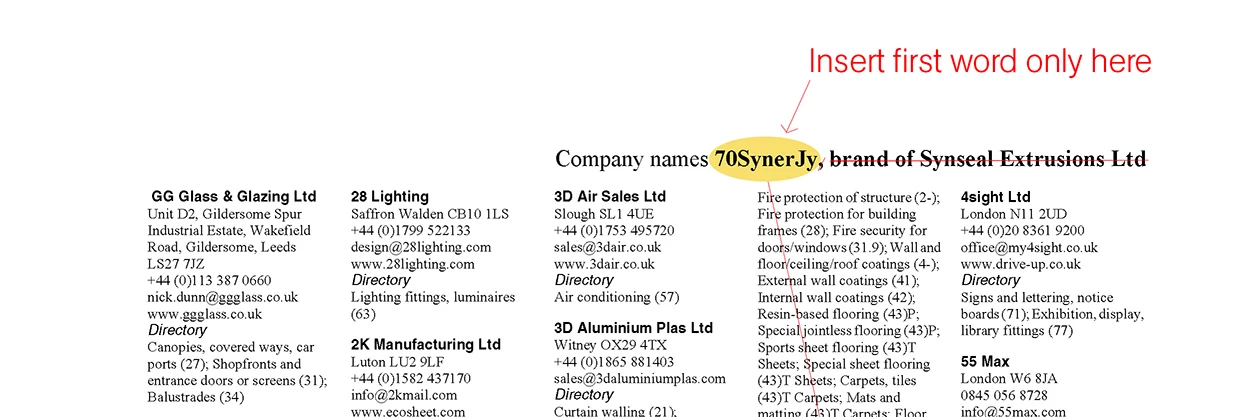
We are using Framemaker 9.0 to generate a Company names Index as part of a large directory of manufacturers. I have set up master pages to automatically generate the first company name on left-hand pages and the last company name on right hand pages, which works fine.

Some of the company names are very long so my question is, can I modify the variable to place just the first word of the company name in the running head each time rather than the entire company name? Are there other modifiers similar to '+,' (selects the last entry on a page) that would create the desired result?

Thanks
This topic has been closed for replies.

2 replies

Participating Frequently
May 23, 2013

Consider dividing company names into two paragraph formats. Set the paragraph format for the short first part of the name to have the Run-in property. This makes the following paragraph start on the same line immediately after the run-in paragraph.

The running head variable can capture the run-in paragraph. I don't have FM available, and I'm quite rusty on how to set up the Running H/F variable to pick up one of several specified paragraph formats, depending on which is present, but if it is endded possible to make this work, I'm sure someone with the expertise will step in and help with that. You'd want the beginning and ending variables to pick up the paragraph format that is applied to complete names that you don't want to abbreviate, except they should pick up the run-in paragraph format if it is present in the first and last entries on the page or spread.

Yes, you'd have to apply the run-in paragraph format manually to company names you want to abbreviate. This is almost the same amount of work as creating <$marker1> markers and typing the short version of a name, but it avoids possible errors when typing names manually.

HTH

Regards,

Peter

_______________________

Peter Gold

KnowHow ProServices

Legend
May 24, 2013
I'm quite rusty on how to set up the Running H/F variable to pick up one of several specified paragraph formats, depending on which is present

Not something I do often either, with my current documents, but when I pluck my trusty FM 7.0 User Guide from the books next to me it shows up as style names separated by a comma. In the example, SectTitle and AppendixTitle are the style names

<paratext[SectTitle,AppendixTitle]>

Other contributors will, I'm sure, flesh out this basic info with explanations about which style is used if they both occur on the page, what happens when one of them appears halfway down the page, and so on …

Participant
May 28, 2013

We are currently looking to add another style/variable [CompanyX] and to repeat the first word of each Company name in the mml file. If we can then call <paratext[+, CompanyX]> which will look for the last entry on right hand pages and ignore all the rest we could be on to a winner. I guess it means the first word will be duplicated in the text for every company name but with some careful setting up of the paragraph style we should be able to get it positioned perfectly behind the full name... a long shot I know! Or indeed set the colour for the paragraph style 'CompanyX' to white.

Thanks to all for feedback on this.

Bob_Niland
Community Expert
Community Expert
May 23, 2013

> ... can I modify the variable to place just the first word ...

Not that I know of.
If I had this requirement, I'd take a look at either:

  • Use Running H/F 3 or Running H/F 4 to pick up abbreviated names from <$marker1> or <$marker2> at each name instance.
  • Use a uniquely-named run-in or side-head paragraph format, invisible text, to store the abbreviated name at each name instance, and pick that up with the Running H/F.

You'll have to type in the abbreviated names in either case.