


Participant
May 6, 2015
Answered

can not delete blank lines

  • May 6, 2015
  • 2 replies
  • 478 views

Hi

Using FM10

I have blank lines that do not show up as \P (carriage returns) and I do not see a anchored frame.

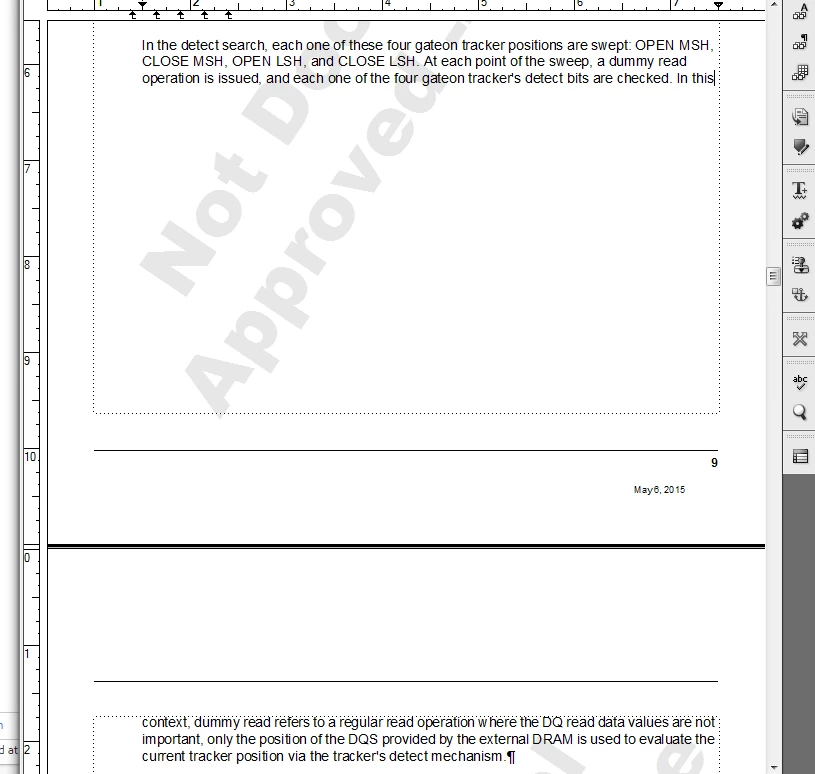
I took a screen snapshot, between the text "In this context" there are all these blank lines. Is there

some "view" in FM10 that will show what's hidden? You can see there are no paragraphs (carriage returns)

in the blank section, at the bottom of the image there is a carriage return after mechanism.

--Ross
    This topic has been closed for replies.
    Correct answer Arnis Gubins

    You may have a Widow/Orphan setting in that paratag that tells FM that it must keep at least three lines together on any one page. This would result in such a break, especially if the following content is something like a figure or table that would not fit at the bottom of the page.

    2 replies

    Participant
    May 6, 2015

    Hi

    Thanks for the help. I opened paragraph designer & pagination sub menu. The keep with radio box Previous Pgf is checked and I modified the value in Window/Orphan Lines: box. I selected the text between \P and changed the value from 3 to 4 and the blank lines disappeared. I looked at other paragraphs and the values in the box changed sometimes it was 3 other places it was 99.

    Maybe when I accidentally did a text paste from a pdf comment block it added esc characters that changed this box value?

    Arnis Gubins
    Inspiring
    May 7, 2015

    Pasting content from a PDF won't change an existing catalog setting. You may see a paragraph with an override, depending upon if you pasted the content as formatted or as plain text.

    Participant
    May 6, 2015

    I now see two occurrences of this problem.

    What controls or what tells FM its the end of a page? Its as if FM thinks these pages have their end-of-page marker if such a thing exists, set at the wrong location in the page.

    Jeff_Coatsworth
    Community Expert
    Community Expert
    May 6, 2015

    I think all that is controlled by the paragraph tags - you might also want to turn on all text symbols to see any para tag markers, end of flow, etc.