

K.Daube
Community Expert
Community Expert
July 16, 2022
Answered

Can not remove Master Page overrides

  • July 16, 2022
  • 4 replies
  • 694 views

After 25 years of FM experience I'm "at the end of my Latin" in FM-15.0.8.979

For the attached FM file this is the situation when switching from Master Page display to Body Page display:
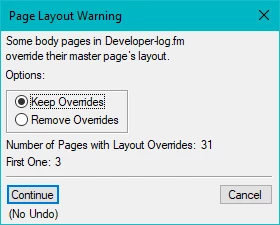
Of course I want to remove these overrides:

  • Set Remove Overrides and use Continue → Switching to MP view and back to BP view issues the vey same message.
  • MIF wash the document → the overrides are still there and can not be removed by the mentioned method.
  • Re-assign the master pages (1 → First; 2…65 → Right/Left) → Overrides still there.
  • Create new document, import all formats, then copy the contens of the flow → Overrides are back...
  • Assign R/L MPs to all pages (no special page 1) → Overrides still there.
  • Opening the document in FM-16.0.4.1062 → same debacle.

A visual inspection of the pages do not show me any deviations from the layout defined by the MPs - so what is the nature of these overrides?

    This topic has been closed for replies.
    Correct answer K.Daube

    Proof of the pudding

    With an ancient program (MIF Browse by Graham Wideman 2003-08-27) I discovered this:

    In the failing MIF there are 5 text frames: the central text frame exists twice - one over the other. Removing this duplicate lets also this file behave.

    So my previous finding about the missing ¶ format Body in the catalogue is not relevant - the problem occurs with such duplicate text frames...

    4 replies

    Barb Binder
    Community Expert
    Community Expert
    July 25, 2022

    Wow, @K.Daube! I went back to examine the right master and the two template frames were perfectly lined up, so there was no visual indication for the second frame. 


    Let's all file that one away for the future. I'm sure we will see it resurface at some point with someone else. 


    ~Barb

    ~Barb at Rocky Mountain Training
    Barb Binder
    Community Expert
    Community Expert
    July 17, 2022

    Hi Klaus:


    The only way I was able to get rid of that message was to create a brand new custom, double-sided document and then import the default master pages into this file. After that, I manually applied right/left to the entire document and the message went away. I replied the first master, and the message didn't come back. Then I imported the original right/left master pages back in and the problem returned. So like David, I think there's something wrong with the default masters, and specifically with the default right master. 


    Can you re-import the page layouts from another file that is working correctly? If not, I would just rebuild the right and left master pages in a new document and then import those in and let us know if that works.


    ~Barb

    ~Barb at Rocky Mountain Training
    K.Daube
    Community Expert
    K.DaubeCommunity ExpertAuthor
    Community Expert
    July 17, 2022

    Thank You all for your tests!

    I'm on the way to vacations. When back in about a week I will compare a correct working MIF (MP) with the corrupted one. A mechanical engineer always wants to know, what is broken...

    (sent from my iPad)

    Dave Creamer of IDEAS
    Community Expert
    Community Expert
    July 17, 2022

    Have a nice vacation!

    Please let us know the results of your tests when you get back. 


    Dave


    David Creamer: Community Expert (ACI and ACE 1995-2023)
    Bob_Niland
    Community Expert
    Community Expert
    July 16, 2022

    Does running an AMP do anything?

    K.Daube
    Community Expert
    K.DaubeCommunity ExpertAuthor
    Community Expert
    July 16, 2022

    «Does running an AMP do anything?»

    According to my points 3 and 5 in my post - no, it does nothing.

    I had attached the file - but for some reason it did not appear in the forum. Try again. Sh... it can be attached, but as soon as I post it disappears. Find it here on my website.

    Inspiring
    July 16, 2022

    As far as I remember, as absurd as it may sound, you can't attach an FM file on this forum

    Barb Binder
    Community Expert
    Community Expert
    July 16, 2022

    Well if you can't figure it out, I don't know how we can! But if you are comfortable sharing the file, I'm happy to take a look. 


    ~Barb

    ~Barb at Rocky Mountain Training