Hi Lew:
I see that you are new here. Welcome. As a heads up, the Adobe Community Forums are user-to-user forums. You may think that you are expressing your anger to Adobe employees, but most of us on here are users like you, who volunteer to help others solve FrameMaker issues in their spare time. We are always happy to help, and kindness goes a long way when working with volunteers.
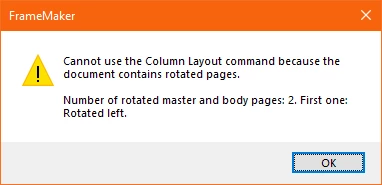
So this is a stand-alone TOC, generated from a single FrameMaker file (and not a book TOC)? In that scenario, FrameMaker will use a copy of that FrameMaker file for the TOC. If the file has two columns, than the TOC will have two columns until you change them. Rotated pages in FrameMaker documents are fairly rare and probably not necessary for the TOC. Can you just remove the two rotated master pages and then see if you change the columns using Format > Page Layout > Column Layout? Alternatively, navigate to the Right Master, control-click to select the template frame and use Format > Customize Layout > Customize Text Frame > Text Frame > Columns Number: 1. Repeat for the Left Master. When you return to the body pages, they should be 1 column.
If neither works, we will need a little more information about how the original file was set up.
~Barb




 AdChoices