
nancy33534756
Inspiring
May 1, 2019
Question

Can't edit styles in .sts

  • May 1, 2019
  • 1 reply
  • 677 views

Hi, all.

I am using FrameMaker 13 in a Windows 10 environment.

All of our user guides use a common template. We output to PDF and .chm. A .sts file from one project contains useful settings for any other project using the same template, so I recently copied

Product A_settings.sts

to the directory for Product B, and renamed it

Product B_settings.sts.

I then opened Project B_settings.sts and discovered that, sure enough, certain conversion settings were not carried over from Project A_settings.sts to Project B_settings.sts, specifically the switch from right-alignment to left-alignment for our H1 and H2 styles. I've come across this before: it's unclear what settings are successfully stored and transferred when you copy an .sts file from one project to another.

Resigned to having to redo these settings, I selected H1 and attempted to edit it:
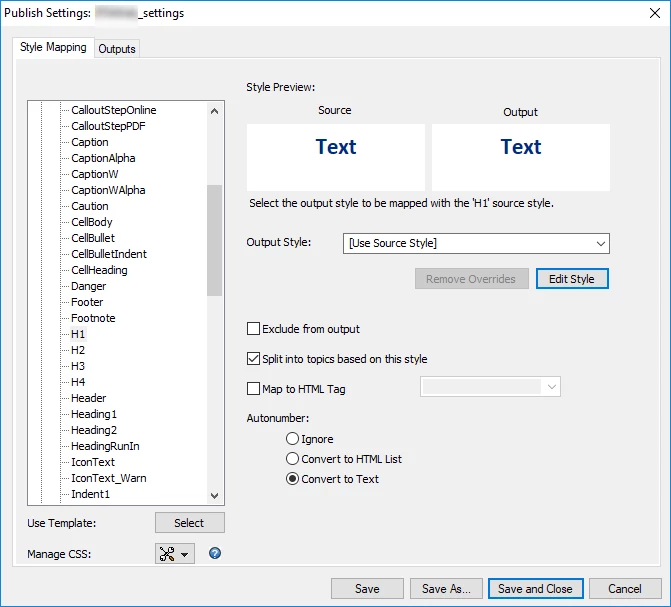
I clicked Edit Style, but nothing happens.

This has happened in the past. Why is the function disabled and how can I get it to work?

Thanks.

--Nancy

    This topic has been closed for replies.

    1 reply

    doug1120
    Known Participant
    May 1, 2019

    Have you tried:

    1. Open Project A_Settings.sts

    2. Verify that it works, can be edited, and saves as it should.

    3. Click the Save As button to save it aProject B_Settings.sts in a different folder.

    4. Close everything and then open a Project B and then see if Project B_Settings.sts works, can be edited, and saves as it should.

    nancy33534756
    Inspiring
    May 2, 2019

    H, Doug.

    Thanks for the suggestion. In following up on it, I discovered that the .sts file I copied to a new directory also can't be edited. It has been a while since there has been a need to edit it.

    This goes to the mysterious flakiness of the .sts file. A friend of mine noted that my version of FM is "antique," which I readily acknowledge. Maybe this problem has been solved in later versions. I used a workaround employing a template, which solves most of my problems.

    Thanks again.