
Inspiring
April 1, 2025
Answered

Can't export to XLIFF 1.2 - Crashes

  • April 1, 2025
  • 2 replies
  • 920 views

Like many others I'm having issues using the native export to XLIFF 1.2. I followed the advice here: https://community.adobe.com/t5/framemaker-discussions/xliff-export-is-crashing-fm-17-0-5/m-p/14987109#M85850 but the suggested solution did not work for me. If I try and save an entire book it temporarily creates the .mif files but once it gets to the end it stops responding then crashes. If I export a single page it gives this error:
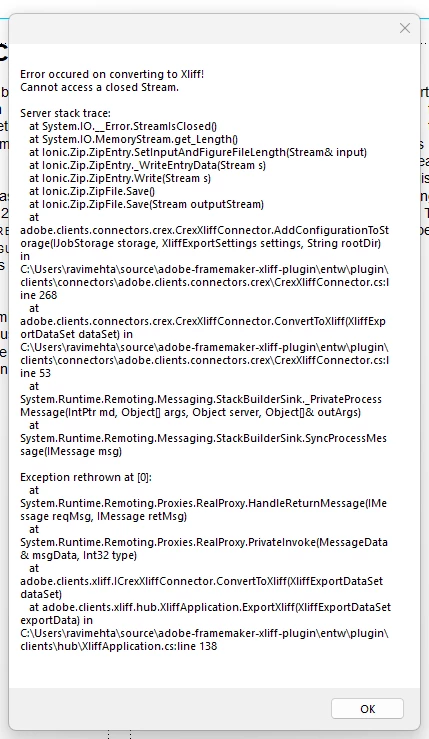
There are no other console messages or error logs.
I had IT update me to 17.0.5 because I was still using the initial release but that didn't solve the issue. It also has issues exporting if I create a new document with a Framemaker-provided template, so it doesn't appear to be issues with settings in my individual file, but who knows. I'm working off my HDD and all files are local.

I've exhausted what I can find online, so if anyone has any other ideas I would be very appreciative! 🙂 I emailed adobe tech comm support but I'm not confident they'll get back to me as I've sent other messages in the past without a response.

    Correct answer Markus Wiedenmaier

    Hi, 

    some hints to troubleshoot, as XTS and it's size is not the issue

    • did you try to use default.xts? same issue?
    • if same issue, did you try to use default.xts and this sample book in your installation C:\Program Files\Adobe\Adobe FrameMaker 2022\samples\UserGuide(Arabic,English,Hebrew)\English
    • if it works, use your xts file? Issue happens again? Please drop your XTS by mail to markus.wiedenmaier@c-rex.net
    • if this also doesn't work, check your document properties. remove them and try again. This will be solved in next release
    • if this also cause same reason, drop a sample, where this is reproducable to same email address

    2 replies

    Markus Wiedenmaier
    Markus WiedenmaierCorrect answer
    Inspiring
    April 2, 2025

    Hi, 

    some hints to troubleshoot, as XTS and it's size is not the issue

    • did you try to use default.xts? same issue?
    • if same issue, did you try to use default.xts and this sample book in your installation C:\Program Files\Adobe\Adobe FrameMaker 2022\samples\UserGuide(Arabic,English,Hebrew)\English
    • if it works, use your xts file? Issue happens again? Please drop your XTS by mail to markus.wiedenmaier@c-rex.net
    • if this also doesn't work, check your document properties. remove them and try again. This will be solved in next release
    • if this also cause same reason, drop a sample, where this is reproducable to same email address
    Inspiring
    April 2, 2025

    Thank you Markus, I tried with the sample book and the export did work with both the default settings file and a new one I saved. Interestingly enough after I tried that I can now create new files and export them, which I wasn't able to before.


    I played around for a little while this morning and came to the conclusion that your correct yes it's something in my document properties causing an issue. Creating a new file and importing everything from the old one except document properties resolved the issue. I sent you the example files in case they're helpful anyways.


    Turns out it's a little bit of a waste of time because I just found out our translation service only accepts XLIFF 2.1 anyways and seems uninterested in supporting an older version. :')


    Thanks for the help.

    Markus Wiedenmaier
    Inspiring
    April 2, 2025

    Emma, this issue with document properties is a known issue. In certain circumstances some XMP Metadata causes export to crash. Till fix is available the only solution is to remove document properties.

    Jeff_Coatsworth
    Community Expert
    Community Expert
    April 1, 2025

    Did you create your own brand-new .xts file to use?

    Inspiring
    April 1, 2025

    Yeah I did what Andreas suggested:

    1. Open XLIFF-Export dialog.
    2. Use Adobes default.xts (in program files) as settings file.
    3. Set all the needed options.
    4. Save my own settings file a a new file in our file system.
    5. Export Book as XLIFF.

      And it gets to the end of my book and crashes.
    Jeff_Coatsworth
    Community Expert
    Community Expert
    April 1, 2025

    Was it the right size one or the 1kb sized one?