
Participant
September 16, 2025
Answered

Can't open the cross-reference panel

  • September 16, 2025
  • 4 replies
  • 147 views

Hi, I can't open the cross-reference panel...

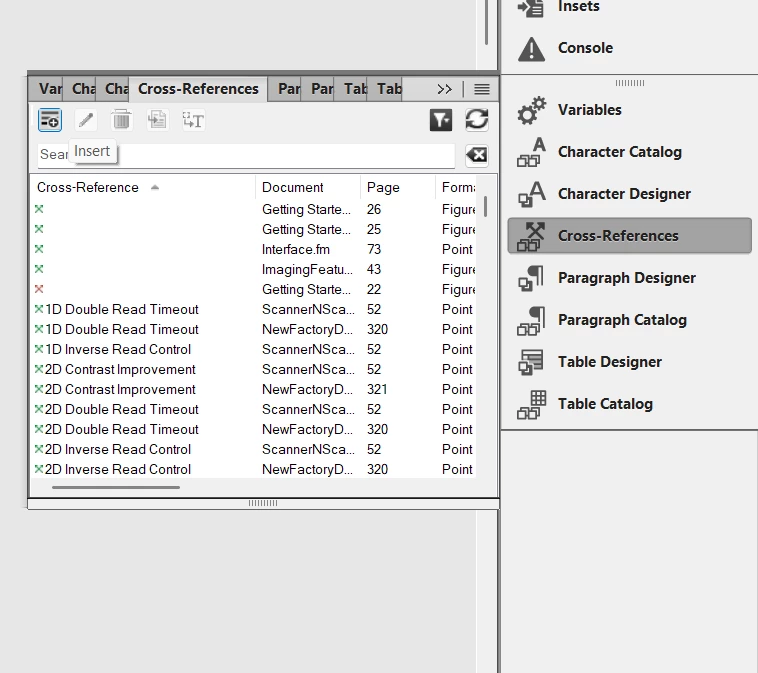
I updated the app to the 17.0.7 version, every time I try to click or create a new cross-reference I can't, it's not clickable and the classic panel doesn't open.
 

    Correct answer frameexpert

    There are two relevant Panels: View > Panels > Cross-References (the one in your screenshot) and Insert > Cross-Reference. Try the latter command.

    4 replies

    Barb Binder
    Community Expert
    Community Expert
    September 16, 2025

    No doubt, Rick has the correct answer. Adobe quietly (ok, more likely I was not paying attention) added two panels to FrameMaker a while back: the Cross-References panel and the Markers panel, not to be confused with the longstanding Cross-Reference and Marker panels.


    The new ones are enabled with View > Panels and the originals are accessed via the Insert menu. I love the functionality of both newer panels because they replace the need to create a generated list of Cross-References and/or Markers but the naming is confusing, at best. I deal with it by arranging them together in my dock.


    I included Variables and Condition tags in my screen shot because while these two pairs are more easily identified by their names, I use them in tandem too, so keeping them together makes my life easier. Designing a custom workspace that simplifies your life is so important!!!


    ~Barb

    ~Barb at Rocky Mountain Training
    frameexpert
    Community Expert
    frameexpertCommunity ExpertCorrect answer
    Community Expert
    September 16, 2025

    There are two relevant Panels: View > Panels > Cross-References (the one in your screenshot) and Insert > Cross-Reference. Try the latter command.

    Jeff_Coatsworth
    Community Expert
    Community Expert
    September 16, 2025

    Do you have any filter applied in that panel? And what's the icon with the plus sign on it doing?

    Jeff_Coatsworth
    Community Expert
    Community Expert
    September 16, 2025

    I fixed your post up to include the image with the text - using the "Insert Photos" icon in the web interface makes it easier for forum participants to see what you're talking about.