
Participant
March 24, 2011
Question

Can't reinstall TCS1 on WIN7- need help

  • March 24, 2011
  • 1 reply
  • 1050 views

I had previously installed TCS1 on my Win7 64-bit system almost a year ago. It had worked fine on WIN7 until recently, Captivate was doing some odd things and began shutting itself down (i.e. when importing slides, working with PS, etc.). So I decided to uninstall the entire suite and reinstall....hoping that will fix multiple minor oddities.

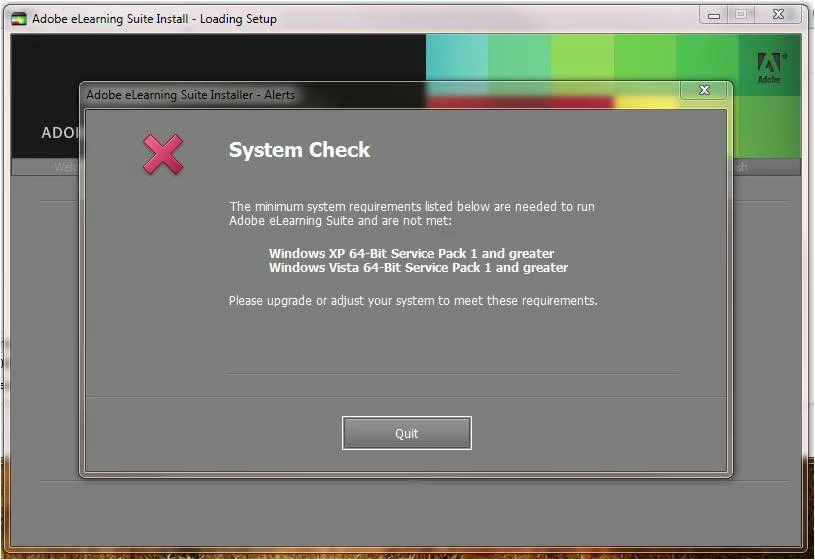
However, now when I try to re-install, it goes through the "System Check" and gives me the message below and won't allow me to install. Has anyone experienced this and is there any ideas on how to fix this or get around it?
Note: I've been trying to contact Adobe Tech support...was in the queue for 50 mins and when I finally got someone to talk to (less then 1 min) the line dropped. I called back in and am in the queue again and it's been 35mins.... 😞

Thanks ahead for any suggestions or fixes you can provide.

--Tammy

This topic has been closed for replies.

1 reply

Jeff_Coatsworth
Community Expert
Community Expert
March 25, 2011

Ok, it looks like there are a couple of funky things going on here - first is that you're getting a message about loading the eLearning Suite, not TCS - are you sure you've got the right installer running here? Second, it's looking for the Win7 SP1 patch to be present - why not go ahead and install it? All reports I've read say that it doesn't do very much except fix a couple of obscure bugs.

sig_tillyAuthor
Participant
March 25, 2011

Sorry, you're right it was the eLearning Suite (not TCS1). The System Check message only points to "Windows XP-64-Bit Service Pack 1 and greater" and Windows Vista 64-Bit Service Pack 1 or greater". Do you think installing WIN 7 Service Pack 1 will fullfil that requirement?  Thanks. :-)

Jeff_Coatsworth
Community Expert
Community Expert
March 25, 2011

I would say so.